
Business requirement
The financial dimension is usually a tricky topic during the implementation because it’s the raw material used by the management accounting for the profitability analysis. So, the degree of complexity can vary in function of each company’s business model. Typically, more complex the business line and the manufacturing/service production are, more structured the management account becomes.
One of the tools at the disposition of D365FO to handle the financial dimension is the derived dimension. However, before explaining it, let me introduce a question:
Imagine you want to attribute a “cost center” on an invoice line, but this value depend on another attribute: For example, for department 023, we want to use the cost center 009. How can we do that?
In fact, this example is too simple, and I will explain more deeply why in the next session “architectural solution”.
Architectural solution
The derivation is a simple input/output function. As input (driver), we insert a financial dimension value to map to another financial dimension value as output (derived).
The first standard limitation is that we can use only one financial dimension as input. However, it can happen that the customers want to derivate the financial dimension from combining multiple input values (for example, as input the geographic zone + brand value to return the profit center).
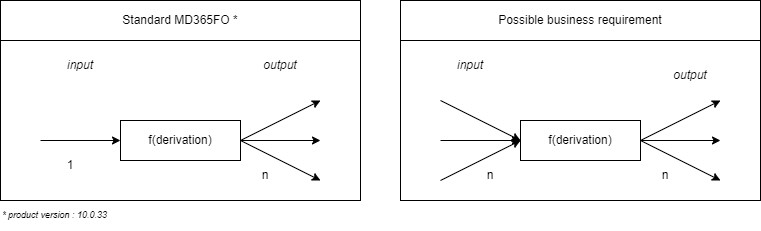
The input value is inherited from the different master data involved in the document (as the customer or product master data). Then, consequently the system derives the value to apply based on the map configured on the system. But when can we apply the derivation? Typically, it can be designed in two different alternative ways:
- Calculate during the report generation (for example, externally using Microsoft Power BI);
- Calculate by D365FO during the document entry using the derivated financial dimension.
What is the better way to choose? Like many questions during the implementation project, it depends on the calculation’s complexity level. If you choose to follow the path of derivate the financial dimension directly on MD365FO, it means you going to have a derivation on a transaction level in real-time and freely. It also means that the manutention of the rules should done in the ERP, and in case of error, you need to write off your wrong general ledger transaction and re-insert it correctly. The suggestion is to follow this solution if it’s the first time you need to derivate a financial dimension for the customer, and the rules are highly stable and clear. Otherwise, you can follow the calculation path during the report generation because it is more flexible and can be for with complicated (and unclear) situation.
However, typically, the main issue during the analysis is to define which attribute to use for derive the financial dimension. When you examine the calculation rules, some input attributes can be “financial dimensions” and other “statistical values”. So, it’s important to be clear about the statistic value: they are not supported by the standard derivation rules. Consequently, you can have just two alternative solutions: 1) you decide to handle them as a financial dimension or 2) you can decide to follow the externalization report solution.
This last solution can become dramatically complex if the statistic values are complicated to fetch and link to the general ledger voucher. Indeed, in some cases, it becomes difficult to split the voucher line. For example, behind a voucher’s line related to a cost account, you can have a purchase order with a tenth of items lines.
So, if you decide to externalize, be very cautious about how to handle the financial dimension to reduce the data collection complexity and what to use as statistical information.
MD365FO solution
Configuration
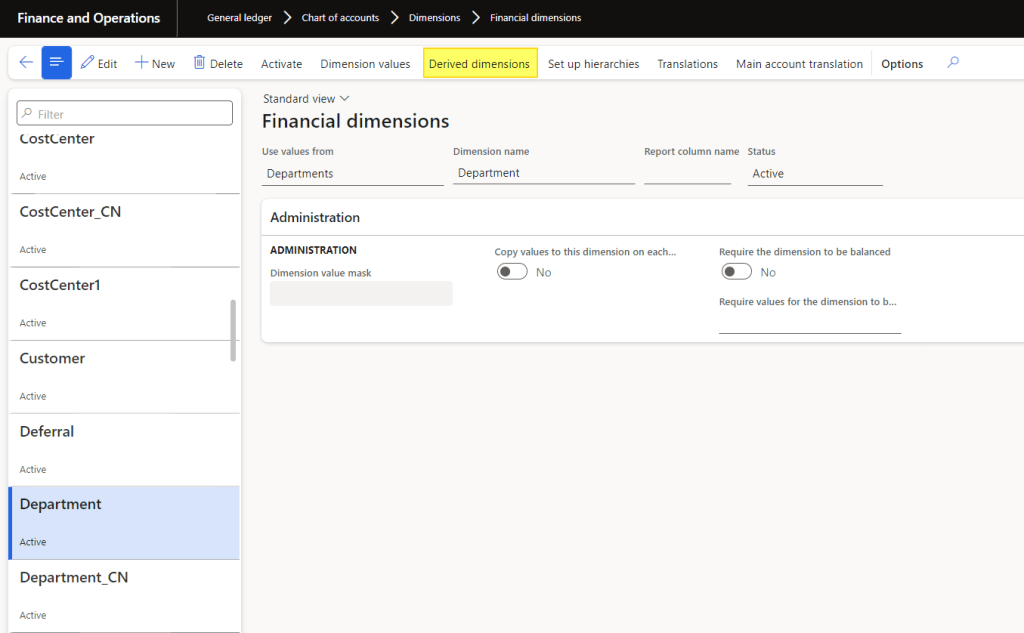
Go to: General ledger > Chart of accounts > Dimensions > Financial dimensions.
Select your input financial dimension and click on “derived dimensions”
The first column is the input value (drive value), and the others are the output value (derived value). Press the “(1) add segment” button to add a new financial dimension as output. On the contrary, if you want to delete an output, select your column and press ” (2) delete”.
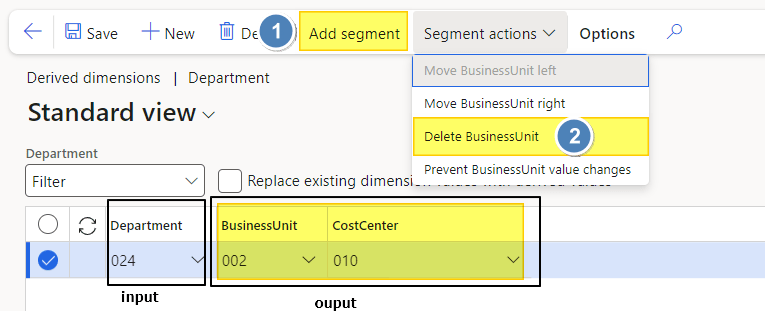
Talk about the last two parameters:
- Prevent changes to derived value: It means that the user cannot change the financial dimension manually on the entry (sales order, purchase order, and general journal)
- Replace existing dimension: if MD365FO already found a value inserted by the user (or inherited), it’s going to overwrite the value with which on derived.
Business process
1- Manual entry
During the manual entry of a general journal (it does not matter the type) or an order, D365FO will derive the financial dimension. It will derive the financial dimension on the header if you put the drive value on the header level or the line level if you insert the value on the line level.
The trigger happens when we insert the value for the first time. If, for some reason, you delete it and save it again, the derivated value is not recalculated.
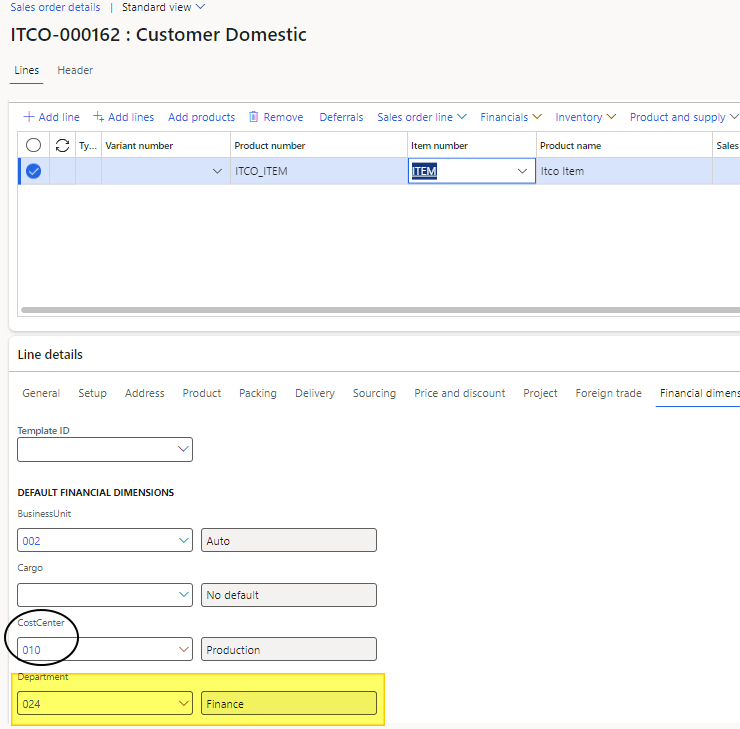
2- Inheriting master data entry
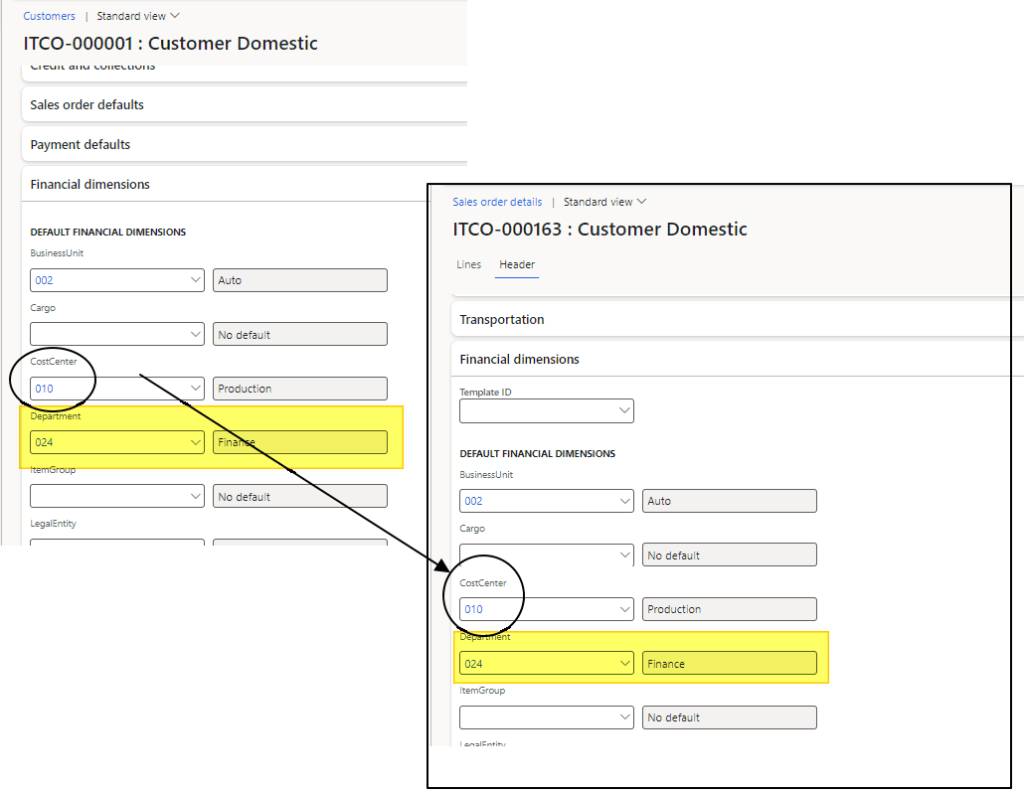
The system derives the financial dimension when we give the driver value on the master data (customer, vendor, items, etc..). Then, all the values are inherited when we create your transaction.
The trigger happens when we insert the value for the first time. If, for some reason, you delete it and save it again, the derivated value is not recalculated.
 Dax365FO
Leave a comment