
Architecture perspective
This article aims to provide a landscape of the budgeting structure in D365FO. So, it’s unnecessary to be a functional expert; you can use this article from an architectural perspective to better understand the functionality component of the solution and the process managed by D365FO. That is an accelerator to understand the overall potentiality present in the D365FO.
Solution’s component map
There are two macro-areas where we can deploy separately or together:
- Budgeting control: We confront the budget against the document entry in real-time. It’s possible to set the system to have just advice in case budgeting exceeds or blocks the operative entry. In case of blocking, the user can request a budgeting review to unblock the registration. The budget control is based on the data inserted from the budget entry. These data can come from the budget planning, or in the alternative, it’s possible to import these from Excel. The document can be subject to the budget control are:
- Advanced ledger entries
- Allocation journals
- Daily journals
- Expense reports
- Fixed asset journals
- General budget reservation
- Payroll pay statements
- Project expense journals
- Purchase orders
- Purchase requisitions
- Travel requisitions
- Vendor invoice journal
- Vendor invoices
- Budgeting planning: The planning can be fed from the D365FO forecast done through the different modules. Splitting the plan based on the different departments and setting specific Excel templates dedicated to them is also possible. These templates can be used for entry, modifying the data, or performing advanced Excel simulations.
You can find below components structure:
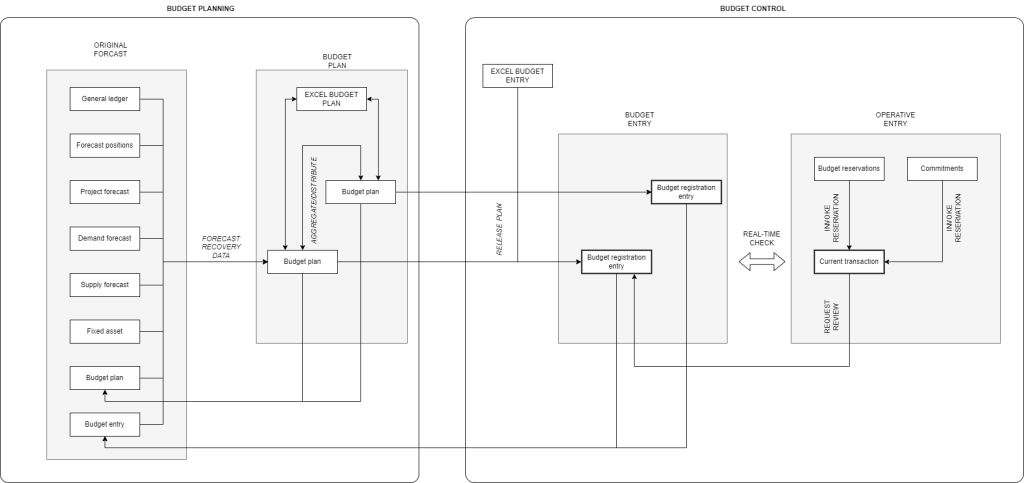
We are going to explore in this table the description of each component:
| Component | Description |
| Budget planning | |
| Original forecast | The forecast’s data can be recovered from different points in the system. They represent the point of contact with the other module. The different forecasts can be used parallelly to generate different budget plans. |
| General ledger | Forecast based on the data on the trial balance |
| Forecast position | Forecast based on the data on the human resource position. For each position, is it possible to insert an estimation of the future cost to manage |
| Project forecast | The forecast is based on estimating the future project transaction (items, hours, expenses, and fees). |
| Demand forecast | The forecast is based on the demand calculated by the Master planning module. It represents the point of contact with the Procurement to Manage stream. Remember that we can perform a dedicated long-term demand forecast just for budgeting purposes. |
| Demand forecast | The forecast is based on the supply calculated by the master planning module. It represents the point of contact with the supply to manage the production stream. Remember that we can perform a dedicated long-term demand forecast just for budgeting purposes. |
| Fixed asset forecast | The forecast is based on the supply calculated by the fixed asset module. |
| Budget plan | The forecast is based on the budget plan. Use the recover the data of a previous budget plan (for example, the previous year’s plan) |
| Budget entry | The forecast is based on the budget entry. Use the recover the data of a previous budget plan (for example, the previous year’s plan) |
| Budget plan | It’s the budgeting planning subject to the approbation |
| Budget plan | The budget plan can be spread into a constellation of sub-budget plans. So, the business uses the parent plan for the final review and approbation. However, it’s possible to have some sub-plans that are going to be owned just by some manager’s department. It’s also possible to have different plans based on different scenarios. The budget plan can be distributed to sub-budget plans or aggregated in a joint plan. |
| Excel budget plan | It’s possible for different budget plans to manage dedicated Excel templates. The Excel templates are used to modify the plan or, in some instances, make advanced simulations and then insert the data in the business plan |
| Budget control | |
| Budget entry | It’s the entry that the system should consider when we make a confrontation between the budget and the actual amounts |
| Excel budget entry | Dedicate Excel to import and modify the budget journal entry present in D365FO |
| Budget entry | The budget entry can be spread into different entries. Each entry can be dedicated to a specific model or cycle. |
| Current transaction | They represent the general entry made by the different document. They are generated through the system from the other module. |
| Budget reservation | For some transactions (like purchase agreements), we want to reserve the amount to be used. Also, if the purchase order isn’t already created, we want to erode the budget entry to reflect the current situation and prevent any blockers. The budget reservation is optional; we can decide to use it just for a certain procurement transaction |
| Commitments | It’s similar to the budget reservation. It’s a reservation of a certain amount to use on the purchase order. The difference is that the reservation is mandatory for the procurement process. If we allow this feature, each purchase transaction should have a commitment pre-insert and approved |
Business process map
The business process is the glue that attaches the solution components between them. So, the business process you can read here is from an application perspective. As a deep input, we invite you also to see the official process shared by MS: https://learn.microsoft.com/en-us/dynamics365/guidance/business-processes/.
Feel free to add some business cases based on your industries or refer to more specific operative business process framework (ADF, APQC, etc.…). The tree process and the description are present in this Excel file:

 Dax365FO
Leave a comment