
This article continues the Capitalized Fixed Asset in D365FO. It provides more information from the architectural perspective: link
The capitalization can be run with a general journal entry or a fixed asset journal. Both solutions are the same; the differences are:
- The master module to use as millstone;
- The journal entry ergonomie;
The principal is to use the fixed asset journal if the capitalization is based on the fixed asset master data. Otherwise, use the general ledger journal if the capitalization is strictly a general ledger entry (no fixed asset module implemented).
Note: both solutions cannot cohabitate stimulatingly.
D365FO solution
Capitalize with fixed asset journal
Go to: Fixed assets> Journal entries> Fixed assets journal.
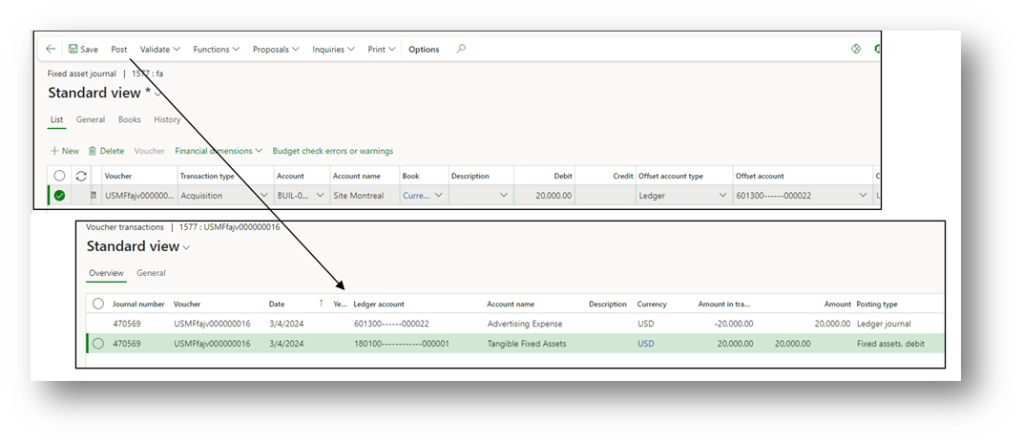
Create the journal and insert at least this data:
- Date: Date of capitalization;
- Transaction type:
- Account: select the fixed asset mast data;
- Book: select the fixed asset book;
- Debit: amount of capitalization
- Offset account type: Ledger
- Offset account: insert the cost account
Lastly, click “post” to make the entry.
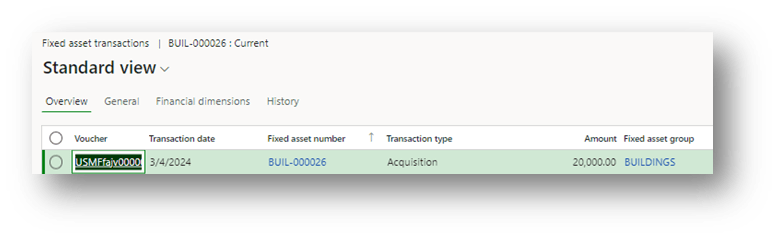
We can also see the fixed asset transaction:
Capitalize with general journal
Go to: General ledger> Journal entries> General journals.
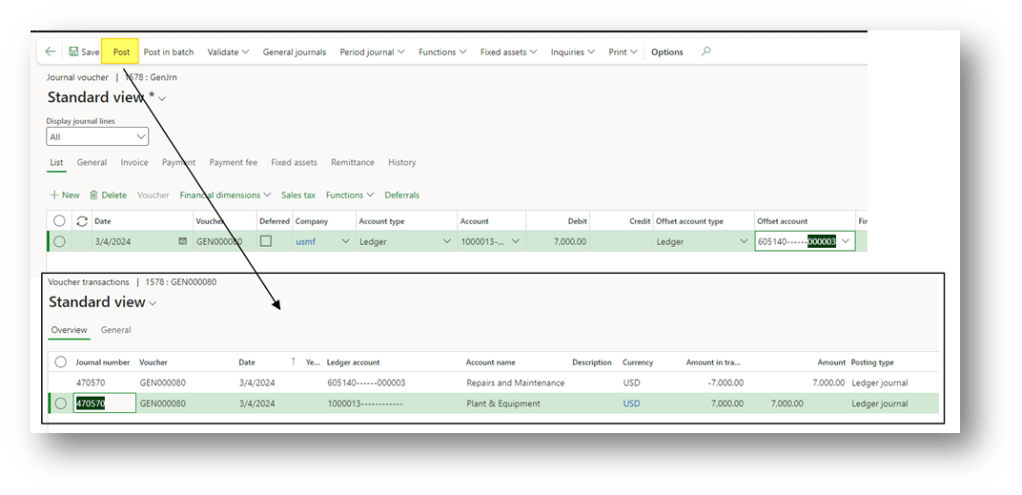
Create the journal and insert at least this data:
- Date: Date of capitalization;
- Account: select the balance fixed asset account;
- Debit: amount of capitalization
- Offset account type: Ledger
- Offset account: insert the cost account
Lastly, click “post” to make the entry.

 Dax365FO
Leave a comment