
This article is an expansion of the price management module explanation. The aim is to explains the quantity conversion unit apply in the sales order.
Business requiremen
In some industry the trade agreements is fixed with a certain unit of measure, otherers the sales order can be insert with another one. For example, in the good we expose the price in kilogram to allow the user a more quicker comparison between the vendor prices. However, we don’t sell the product by kilogram but by bag. Therefore, we need that D365FO convert the sales unit price in kilogram to bag.
At standard, there are two ways to mange that:
- Sales & Marketing: We should to create a trade agreements for each unit of measure. In other terms: create a trade agreements also for the bag;
- Pricing management: Insert the trade agreement with the reference unit of measure. Then, let the system convert the price during the sales order creation
In this paper we talk about the second solution
D365FO solution
Trade agreements journals
Go to: Pricing management> During-sales pricing> Sales trade agreement price> Trade agreement journals.
Insert the records as usual, but to allow the quantity conversion flag “allow unit conversion”:

In this example, we agree to shell the items FL02 for 20 USD per kilogram.
Release product
Go to: Product information management> Products> Released products.
Insert for our product the unit of measure to convert the trade agreement unit of measure in another units:

In this case 1 bag equivales to 20 kg.
Sales order
Go to: Sales and marketing> Sales orders> All sales orders.
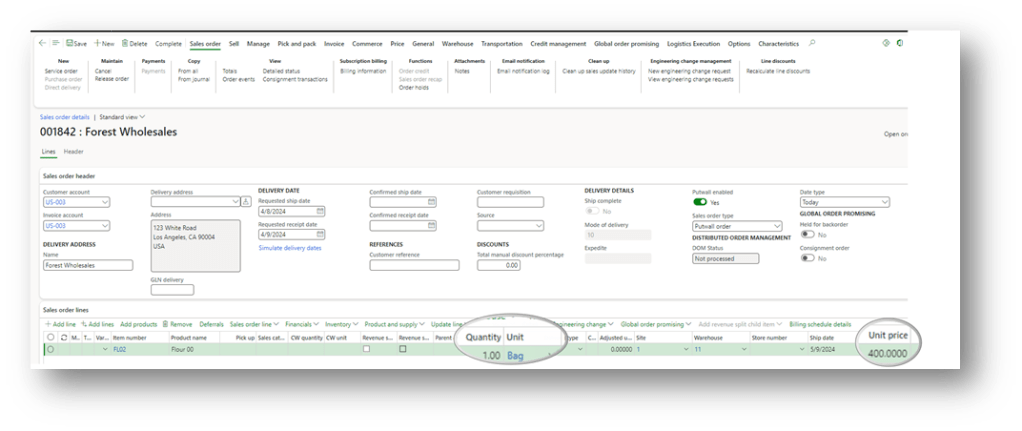
Create the sales order. If the system work correctly, it should make this calculate: (20 USD / 1 kg) x 20 kg = 400 USD per bag
As you can see, with the pricing management D365FO automatically convert the unit price:

 Dax365FO
Leave a comment