
Business requirements
Posting restrictions are a validation that checks if the posting user is the same of the creation user. Don’t confuse this functionality with the approbation workflow because this one doesn’t work directly on the posting. The workflow’s responsibility is to authorize or deny the user’s proceeding with the posting. It does not care about who the poster is or if it’s different from the creator.
Solution D365FO
Configuration
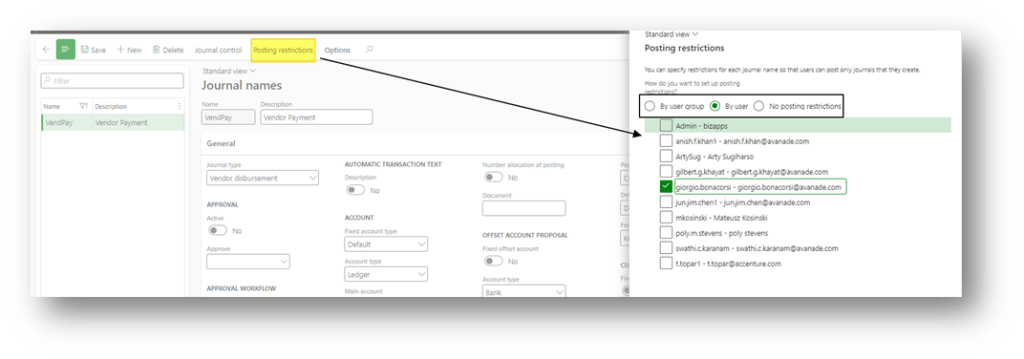
Go to: General ledger> Journal setup> Journal names.
Select the journal where we want to apply the validation rules and press “Posting restriction”.
Where select the policy to apply to identify who posts are the same user that created the journal. The identification can be by user or user group:
Process
Post journal
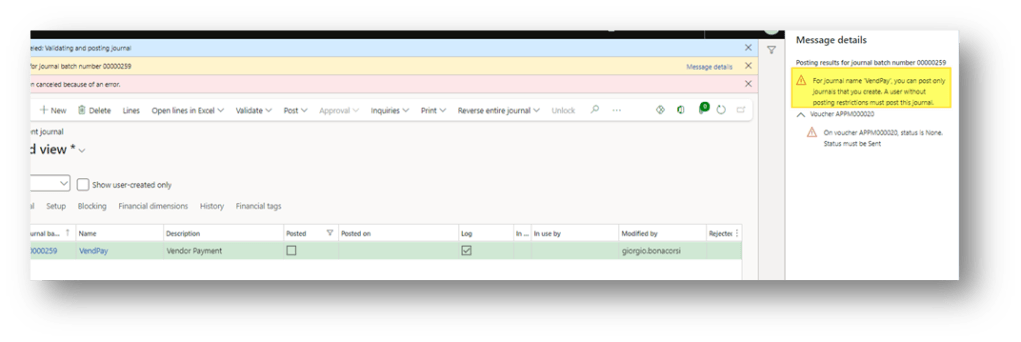
Go to our journal and try to post. If the user is present in the posting restriction, the system checks if she/he is the same who created the journal. If it isn’t, the system returns an error:

 Dax365FO
Leave a comment