
Business requirements
Accruals are the postings used to allocate revenue or costs throughout the time. For example, when we record an insurance invoice, we have to make a one-shot cost recognition. However, the insurance contract covers several months. So, we have to split this cost among the different months to represent the real cost in our inquiries.
Example:
Below is the case of an insurance invoice for 1000 $ recorded in February:
| Month | Event | Main account | Debit | Credit |
| 2 | Vendor invoice | Vendor | 1220 | |
| 2 | Vendor invoice | Insurance | 1000 | |
| 2 | Vendor invoice | VAT | 220 |
The invoice is registered at the beginning, and the total covering period is longer than five months. If we do 1000$/5 months, we obtain a monthly cost competence of 200$. So, we have to reallocate this cost for 200$ over five months.
| Month | Event | Main account | Debit | Credit |
| 2 | Vendor invoice | Vendor | 1220 | |
| 2 | Vendor invoice | Accrual cost | 1000 | |
| 2 | Vendor invoice | VAT | 220 | |
| 2 | Accrual | Insurance | 200 | |
| 2 | Accrual | Accrued | 200 | |
| Month | Event | Main account | Debit | Credit |
| 3 | Accrual | Insurance | 200 | |
| 3 | Accrual | Accrued | 200 | |
| Month | Event | Main account | Debit | Credit |
| 4 | Accrual | Insurance | 200 | |
| 4 | Accrual | Accrued | 200 | |
| Month | Event | Main account | Debit | Credit |
| 5 | Accrual | Insurance | 200 | |
| 5 | Accrual | Accrued | 200 | |
| Month | Event | Main account | Debit | Credit |
| 6 | Accrual | Insurance | 200 | |
| 6 | Accrual | Accrued revenue | 200 |
D365FO presents a way to calculate and apply this splitting using the accrual scheme in the journal.
D365FO solution
Configuration
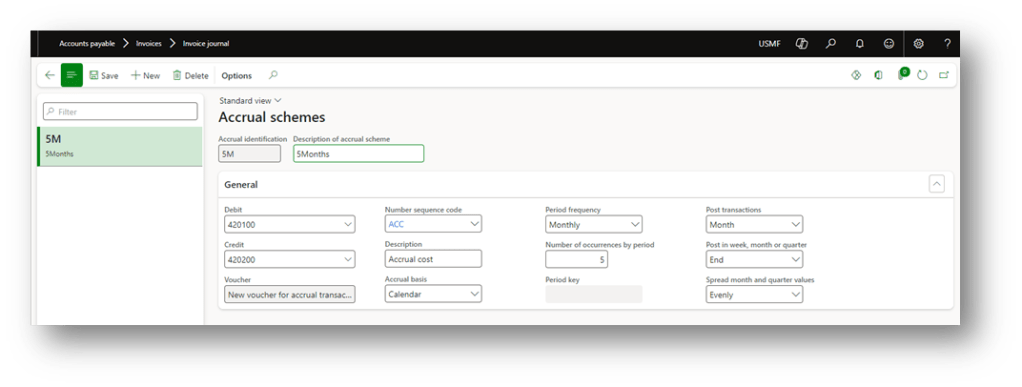
Go to: General ledger> Journal setup> Accrual schemes.
Here, we can configure the accrual scheme to invoke during the journal creation. Below is the setup to do:
- Debit: The account is to be used for debit during the accrual recognition in the original voucher as a substitution for the cost/revenue account. For more information, see the business requirements;
- Credit: The account is to be used for credit during the accrual recognition in the original voucher as a substitution for the cost/revenue account. For more information, see the business requirements;
- Voucher: How to recognize the voucher number to apply on the new accrual transaction;
- Same voucher for all transactions: Same voucher of the original registration;
- New voucher for accrual transactions: New voucher number created for all the accrual transactions
- New voucher for each accrual transaction date: New voucher transaction created for each accrual transaction
- Number sequence code: If we don’t decide to use the same voucher of the original transaction, we have to select here the voucher number to use for the accrual transaction;
- Description: Description inserted by D365FO on the voucher transaction
- Accrual basis: How to recognize the allocation period of time:
- Calendar: indicated in the accrual scheme
- Fiscal: use for yearly allocation;
- Allocation key: indicate in the key
- Periodic frequency: Unit of measure to recognize the economic competence
- Number of occurrences by period: Number of competence period
- Post-transaction: Frequency of the transaction posting
- Post in: indicate if posting at the beginning, middle or end of the period
- Speed: Indicate if spread the amount across the period number or based on the days contained in a period
Business process
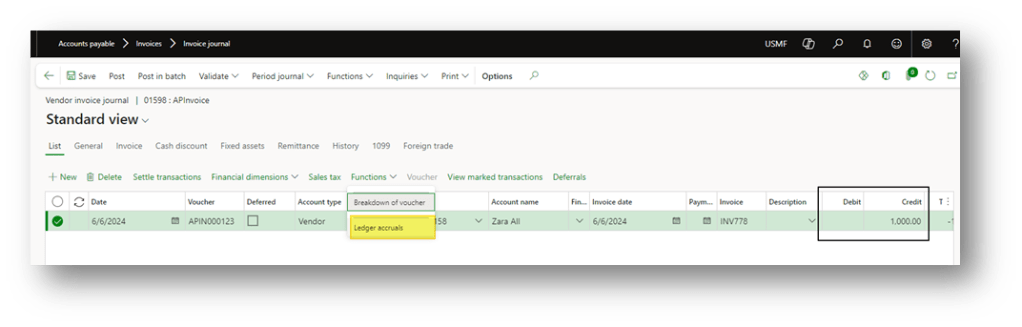
Create a journal, and press: function> ledger accruals.
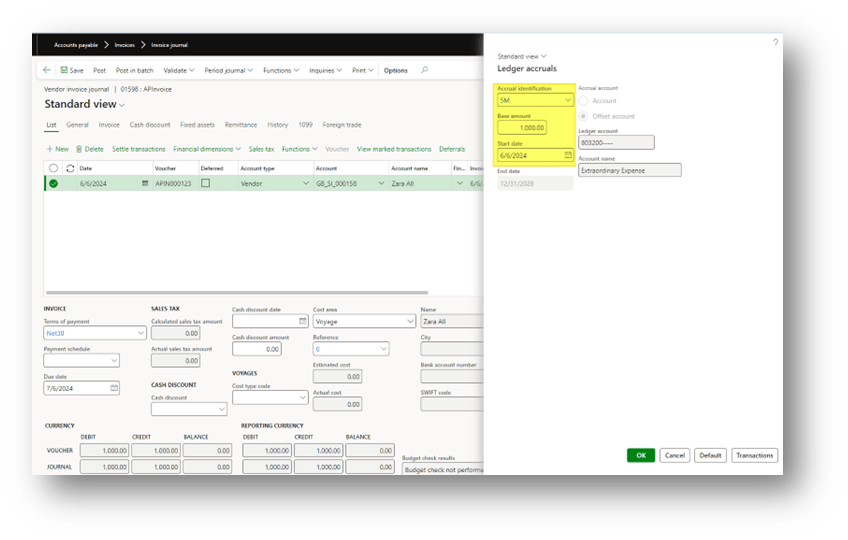
We can select here your actual identification previously configured, the amount subject to accrual and the stated date. If we have to allocate cost/revenue on the pass, we have simpler to put the start date from the pass:
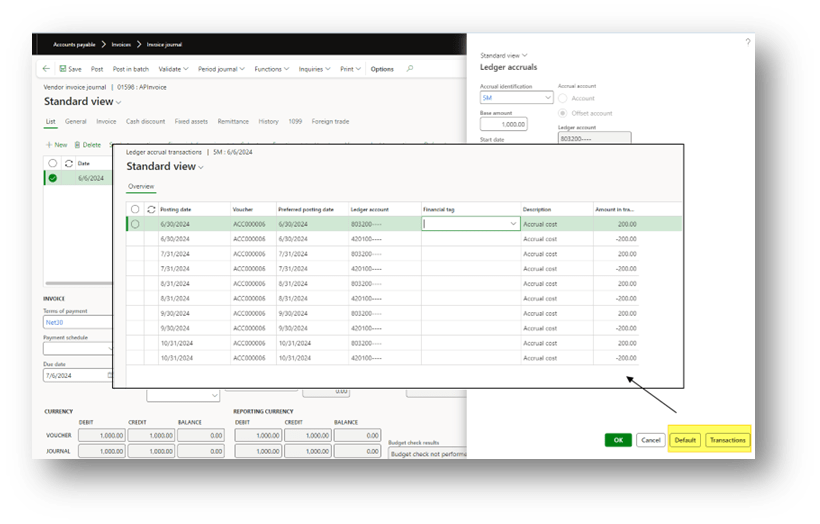
Before confirming, we can press “transaction” to have a simulation of the future posting. Meanwhile, if we make some changes to the configuration, we can press “default” to reinitialized the calculation of the accruals:
Process the journal posting. After the posting, the D365FO will automatically post the accrual at the same time that we post the journal.
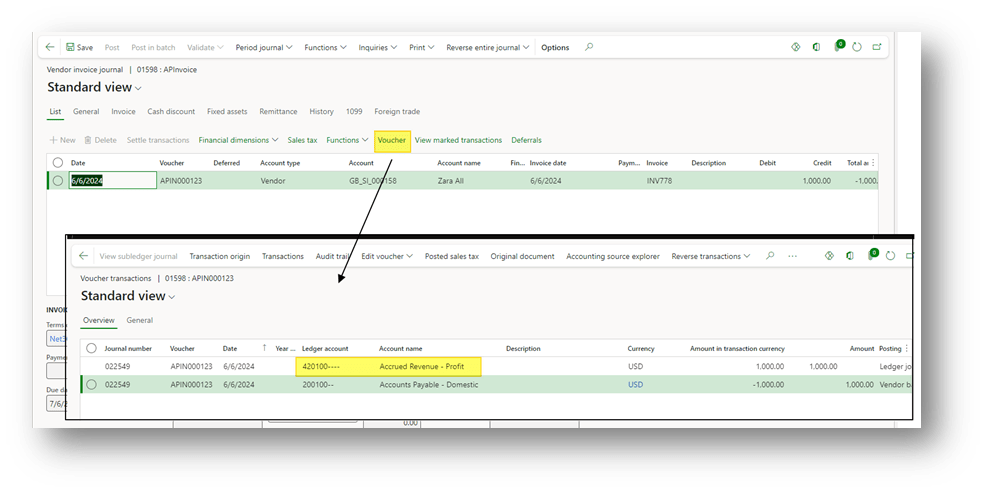
As we can see on the original transaction, the system automatically substituted your cost/revenue account with the accrual account:
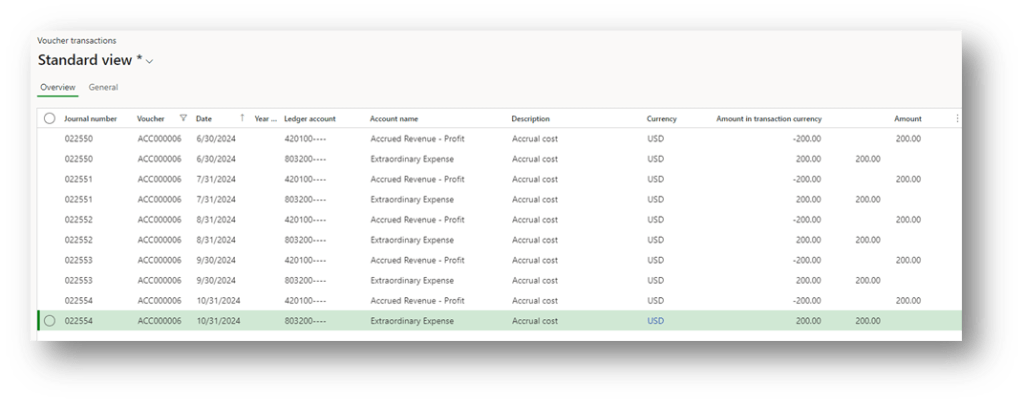
Meanwhile, the system post also the accruals:
Note:
There is no way to recover the accrual transactions from the original voucher. To have to possibility to do it, you can vote this idea: https://experience.dynamics.com/ideas/idea/?ideaid=0959f47e-8fd0-e911-b083-0003ff68b400

 Dax365FO
Leave a comment