
Architecture perspective
The article aims to provide an architectural landscape of the leasing solution. First, we will review the solution’s components, explore the business process and give an overview of the migration strategies. You do not need to be a D365FO expert to understand these concepts. This article is simply an accelerator to becoming aware of the D365FO leasing solution.
Solution’s component map
The solution is articulated throughout four different areas:
- Lease contact: It contains the agreement’s terms, such as vendor, payment schedule, expense, etc.
- Lease book: The book contains information on the accounting framework, such as payment, expense, depreciation, and interest schedule proposals for future postings. Each book includes also the historical data of the transaction entry posted. Therefore, it contains data of our lease accounting.
- Lease operations: We can trigger different operations in the lease book, such as initial recognition calculation, payment schedule posting, /etc. Contrary to the book, the lease operations are the actions that we can do in the book to make the planning and the posting;
- Lease transactions: All the lease transaction records on the lease book. The system will automatically perform different types of journals based on which kind of operation it is.
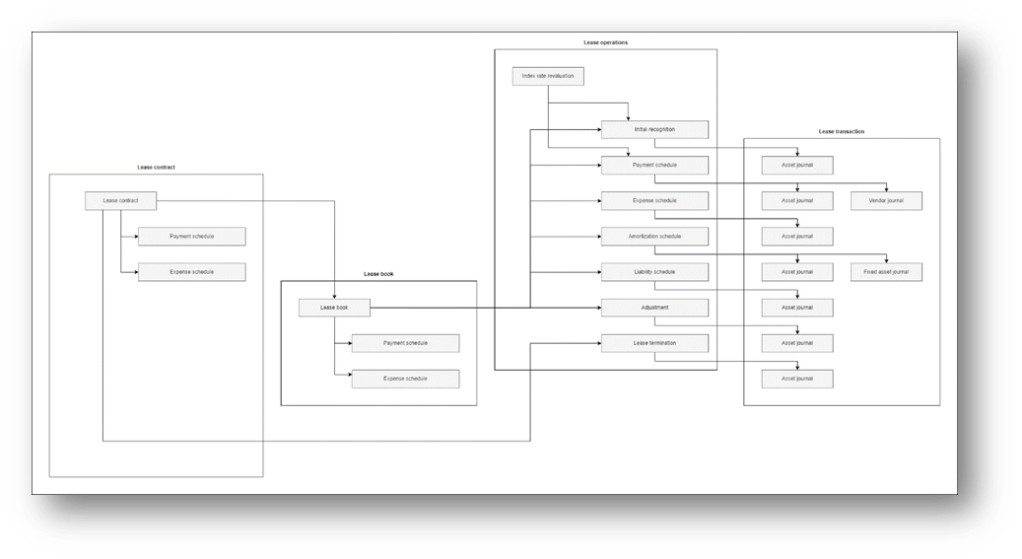
Below, we can find the components list:
| Component | Description |
| Lease contract | |
| Lease contract | Lease agreements information |
| Payment schedule | Planning the payment that we forecast |
| Expense schedule | Planning the expense that we forecast |
| Lease book | |
| Lease book | Accounting framework information (ASC 842, IFRS 16, etc..) |
| Payment schedule | Planning of the payment that we forecast inherited from the contract |
| Expense schedule | Planning of the expense that we forecast inherited from the contract |
| Lease operations | |
| Initial recognition | Initial value recognized for the financial lease |
| Payment schedule | Schedule the payment planned and trigger the transaction posting. |
| Expense schedule | Schedule the expense planned and trigger the transaction posting. |
| Amortization Schedule | Schedule the amortization planned and trigger the transaction posting. |
| Liability schedule | Schedule the interest planned and trigger the transaction posting. |
| Adjustment | Adjustment of the initial recognition value |
| Index rate revaluation | Periodic revaluation of the interest |
| Lease Termination | Calculation of lease termination amount |
| Lease transactions | |
| Asset journal | Transaction in the lease module |
| Vendor journal | Transaction in the account payable module |
| Fixed asset journal | Transaction in the fixed asset module |
Business process map
To understand better the lease process, we must be aware of the difference between:
- Operation lease: The lease is considered as rent, so we just make a payment each lease period
- Financial lease: The lease isn’t considered rent but is the recognition of a right to use. So, we have to capitalize the actual value of the right of use as a fixed asset and liability. Then, we have to proceed with posting the depreciation, interest, and payment.
The business process is the glue that attaches the solution components between them. So, the business process you can read here is from an application perspective. As a deep input, we invite you also to see the official process shared by MS: https://learn.microsoft.com/en-us/dynamics365/guidance/business-processes/
Feel free to add some business cases based on your industries or refer to a more specific operative business process framework (ADF, APQC, etc.…). The tree process and the description are present in this Excel file:
Migration
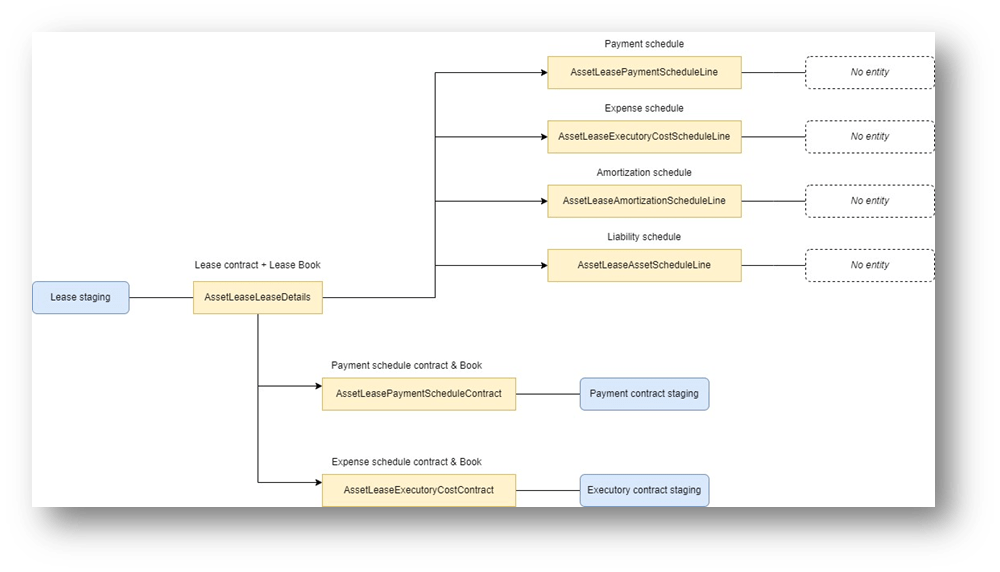
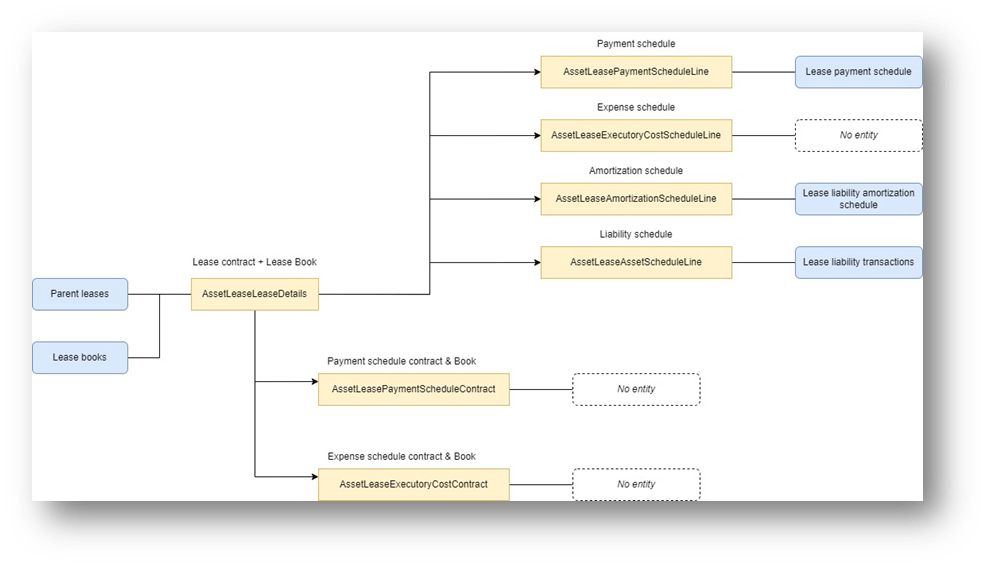
There are two alternative strategies to migrate the leases. In the diagram presented below, you can find in yellow the table name and in blue the data entity offered by the standard:
- Lease staging: Migrate all the lease contracts and books. Then, the lease operation will be triggered as usual. So, we don’t migrate the payment, depreciation, expense and interest schedule and historical records. It will be generated by the k-user using normal operational activities/batch.
- Direct migration: The lease data can be migrated directly to the related tables (contract, payment schedule, etc.). However, pay attention: not all tables the module uses are part of a data entity. If we want to migrate the data on those tables, we must create a custom data entity.

 Dax365FO
Leave a comment