
Summary
This article presents an overview of the integration between D365FO and Power Apps. When handling company requirements that differ from the standard, one alternative is implementing a Power Apps solution. However, throughout Power Apps implementation, we usually face two issues: 1) it’s not so simple to understand the pros and cons of implementing this kind of design; 2) when we decide to follow the integration solution path, it’s not always clear the architectural element involved and who they interact between them.
Usually, Power Apps become interesting when:
- we have to deal with external users, that who don’t use D365FO;
- make applications to manage data manually when we are in motion
- we have to integrate our solution with external services.
So, it’s a solution to extend the D365FO function in this sense. If there is customization like allocation of cost, calculating line discount, etc… the adoption of Power Apps is not automatic. We have to choose wisely, considering the pros and the cons. It’s moving of the development effort from D365FO to Power Apps, but we have to be careful to don’t overwhelm the building because it can become quickly complex to manage integration between a bunch of systems (it’s not a spaghetti solution; it’s become a salami solution). Furthermore, Power Apps is like a GUI framework because its role is to present data to the user and interact with it, but it’s not designed to make massive and complex data calculations and updates.
Architectural perspective
Here is the landscape of the integration architecture framework between Power Apps and D365FO. We can start to see that the users have two alternative ways to consume the integration between Power Apps and D365FO:
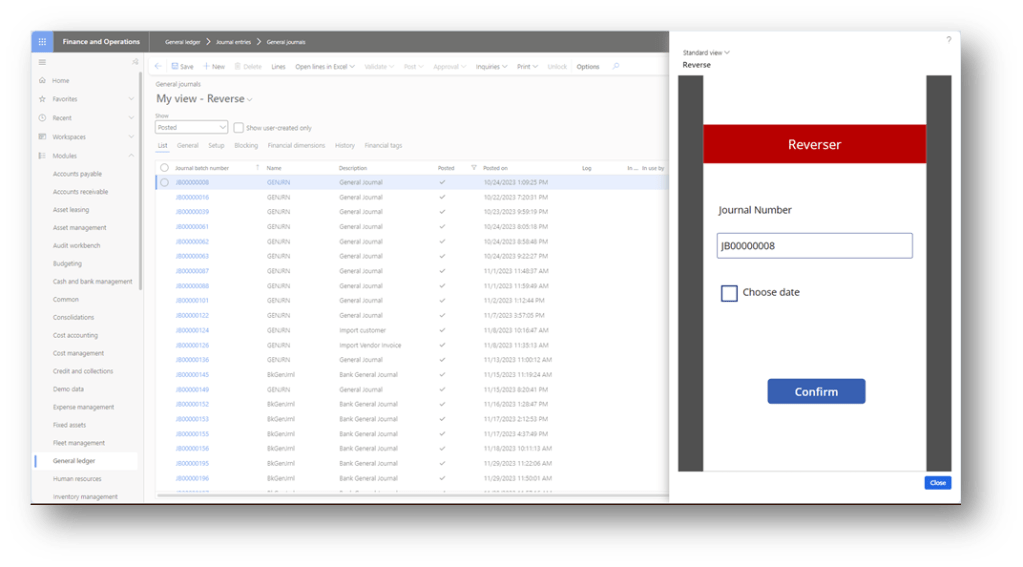
- Internally: Use the app directly in D365FO. In this case, we can select records from D365FO and give them to the app;
- Externally: Use the app externally, without the necessity to open D365FO;
We will explain the details of the elements involved and their synergy.
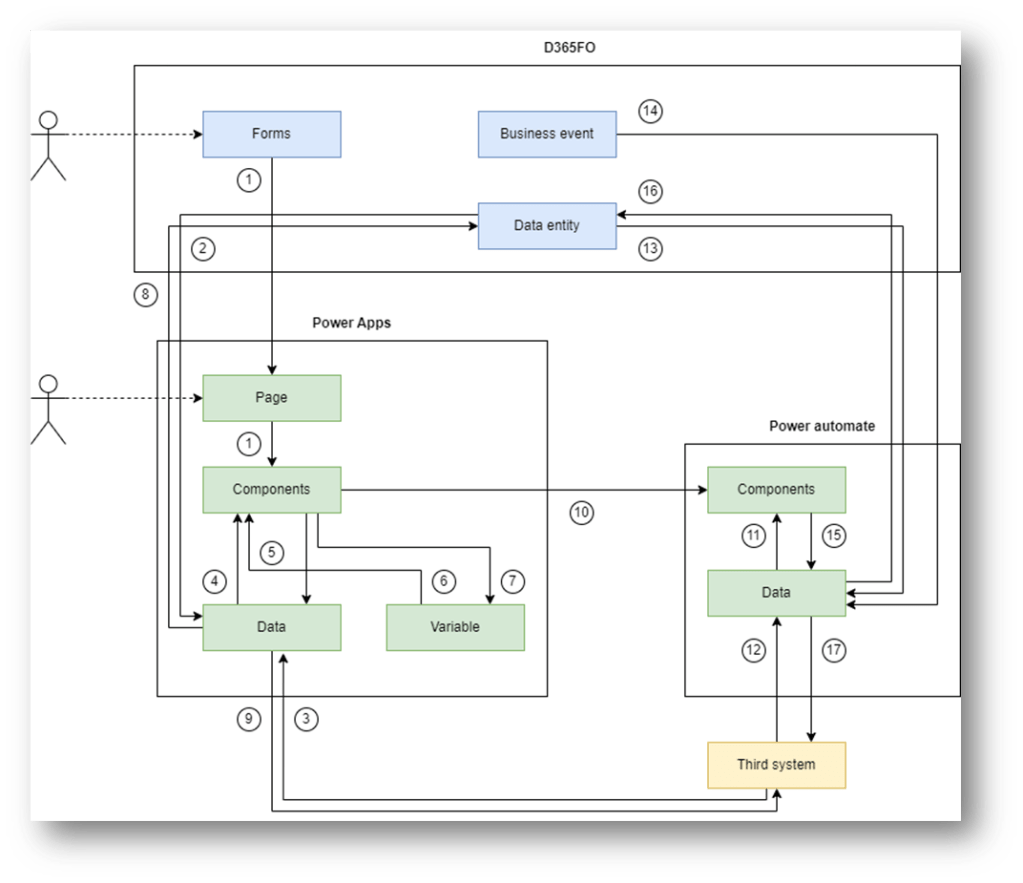
Elements list
We can find below a quick summary of the information to be aware of each architectural element:
- D365FO-Forms: It’s the front end used by the user in D365FO. During the work, it is possible to invoke an app to trigger some tasks. Consider that:
- One variable: We can directly pass from the form to the app just only one variable;
- No multiple selection: We have to trigger the record one by one. We cannot pass multiple selections to the Apps in one shot
- D365FO—Business event: The business event is a notification sent to D365FO that a specific event has happened. The notification is accompanied by event values. For example, we can set the business event to notify us that a sales order has been confirmed. The notification will say that we confirmed a sales order, and in the communication, we can find the confirmation number, customer, etc…
The standard already proposes a collection of business events ready for use. However, based on your business process, don’t exclude the possibility of customizing to add the one you need.
For more details, you can read these materials: https://learn.microsoft.com/en-us/dynamics365/fin-ops-core/dev-itpro/business-events/home-page
- D365FO – Data entity: It’s the object that we call to create, retrieve, modify and push data in D365FO. However, we have two different kinds of integration paths possible:
- Open Data Protocol (OData): We can do a call to manipulate the record. However, the data entity should be public and visible for the API. For more details, you can see this material: https://learn.microsoft.com/en-us/dynamics365/fin-ops-core/dev-itpro/data-entities/odata
- Recurring integration: We leverage the data management using the API. We can schedule a data management project to call to import and export data: https://learn.microsoft.com/en-us/dynamics365/fin-ops-core/dev-itpro/data-entities/recurring-integrations
- Power Apps – Page: Power Apps is a GUIs, composed of different components. The components are combined to give a graphical experience, and .the user will see and navigate through the pages during the current activities.
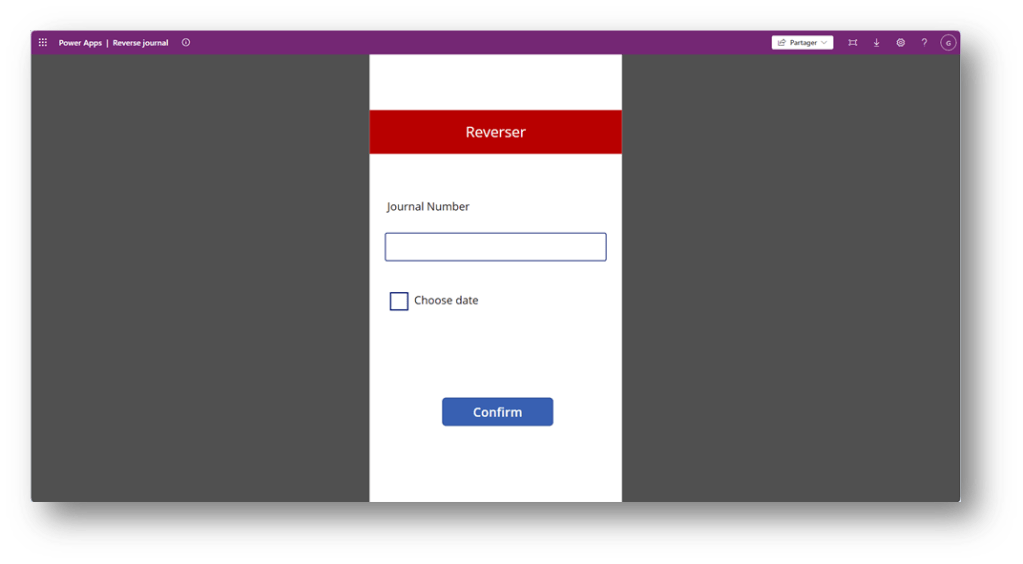
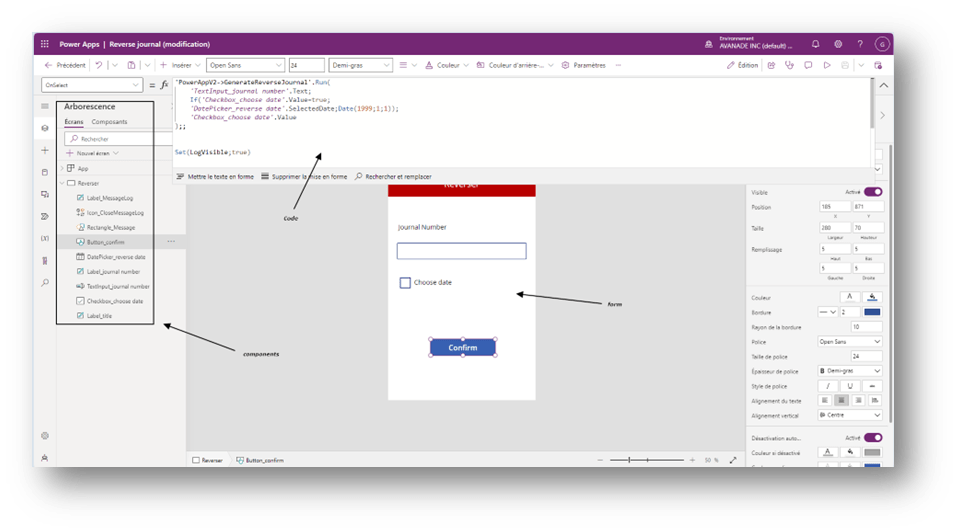
- Power Apps—Components: The components are elementary objects like buttons, text, input field, etc.. We can code our components’ properties to follow different behaviours.
But Power Apps runs its own code language, based on a procedural rather than object programming framework. That means, if we want to build our own class and function to be reused, we cannot do it directly. The indirect solution is to create a custom component that contains functions and insert it in our form like an invisible component.
The logic is that Power Apps are here to trigger action and not perform heavy calculations on the data.
For more details, you can read this material: https://learn.microsoft.com/en-us/power-platform/
- Power Apps – Data: They are the data that we collect from different sources. The main data source in your case is D365FO, but note that you should avoid complementing it with third data.
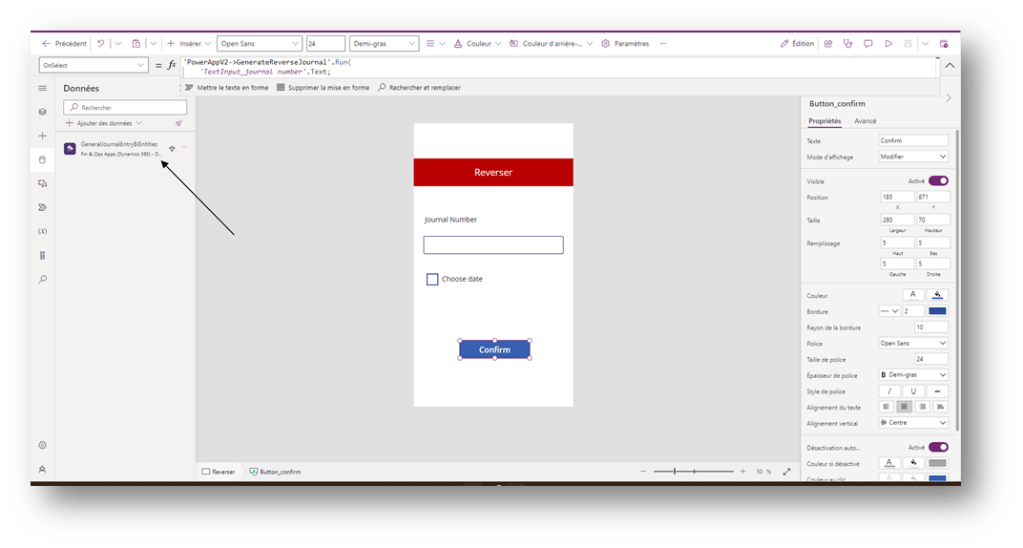
For more details, you can read this material: https://learn.microsoft.com/en-us/power-platform/
- Variable: As the names say, they are the variable set and used by our components code.
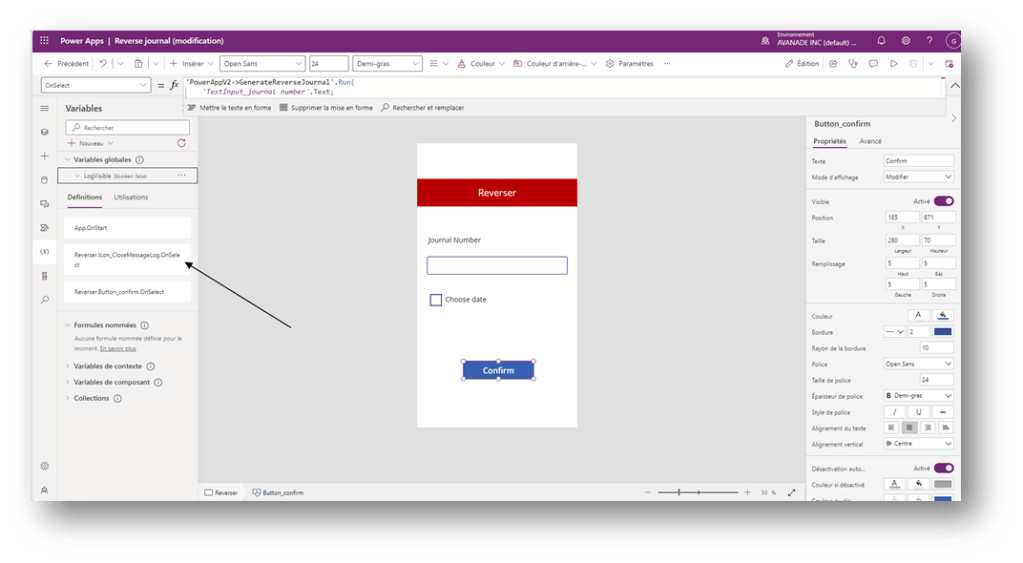
For more details, you can read this material: https://learn.microsoft.com/en-us/power-platform/
- Power automation—Components: Like the pipeline for gas, power automation is a pipeline of data. The components organize the data journey from one system to another.
We collect the data, and we can softly treat them (for example, extract data or change format). Then, these data are sent to be consumed by the third system.
It’s interesting to note that we can trigger the Azure function: https://learn.microsoft.com/en-us/azure/azure-functions/functions-overview
For more details about the components, you can read this material: https://learn.microsoft.com/it-it/training/powerplatform/power-automate
- Power automate – Data: the object of our pipeline.
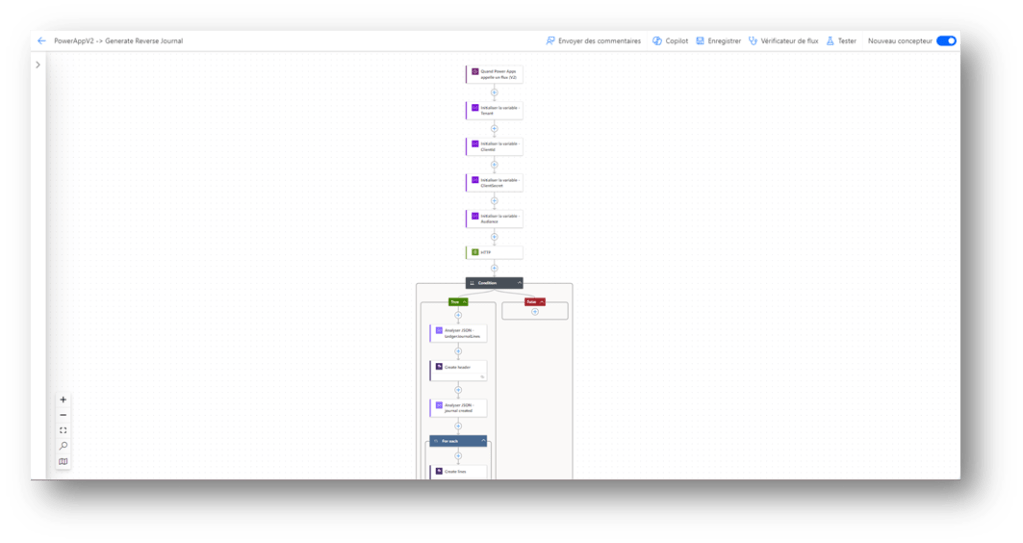
Element synergy
We can find below a quick summary of the information to be aware of the synergy of the elements:
| ID | From | To | Description |
| 1 | D365FO – Forms | Power Apps – Components | Trigger event and pass data through the Power Apps components (like button) |
| 2 | D365FO – Data Entity | Power Apps – Data | Send data from D365FO to Power Apps |
| 3 | Third system | Power Apps – Data | Send data from the Third system to Power Apps |
| 4 | Power Apps – Data | Power Apps – Components | Components consume the data received. We can show it to the user and perform functions. |
| 5 | Power Apps – Variable | Power Apps – Components | Components use variable values. We can show it to the user and perform functions. |
| 6 | Power Apps – Components | Power Apps – Data | Add, Update or Delete data from the components |
| 7 | Power Apps – Components | Power Apps -Variable | Add, Update or Delete variable components |
| 8 | Power Apps – Data | D365FO – Data entity | Send data from Power Apps to D365FO for creation, updating or deletion |
| 9 | Power Apps – Data | D365FO – Third system | Send data from Power Apps to the Third system for creation, updating or deletion. |
| 10 | Power Apps – Components | Power automate – Components | Tigger the start of a power automate process and pass data |
| 11 | Power automate – Data | Power automate – Components | Components consume the data received. We can extract info or convert the format. |
| 12 | Third system | Power automate – Data | Collect data from third system to Power Apps |
| 13 | D365FO – Data Entity | Power automate – Data | Collect data from third system to Power Apps |
| 14 | D365FO – Business event | Power automate – Data | D365FO trigger that an event happened and sends the value |
| 15 | Power automate – Components | Power automate – Data | Add, Update or Delete data from the components |
| 16 | Power automate – Data | D365FO – Data Entity | Send data from Power Automate to D365FO for creation, updating or deletion. |
| 17 | Power automate – Data | Third system | Send data from Power Automate to Third system for creation, updating or deletion |
Credit
If you are interested in doing a quick project to practice, I recommend visiting Ludwig Reinhard’s blog. An example here is an application to reverse journal in D365FO: https://dynamicsax-fico.com//?s=reverse&search=Go

 Dax365FO
Leave a comment