
The configuration should be implemented from both technical and functional perspectives. In our case, we will focus on the functional configuration to run the feature. Here is an overview of all our configurations:
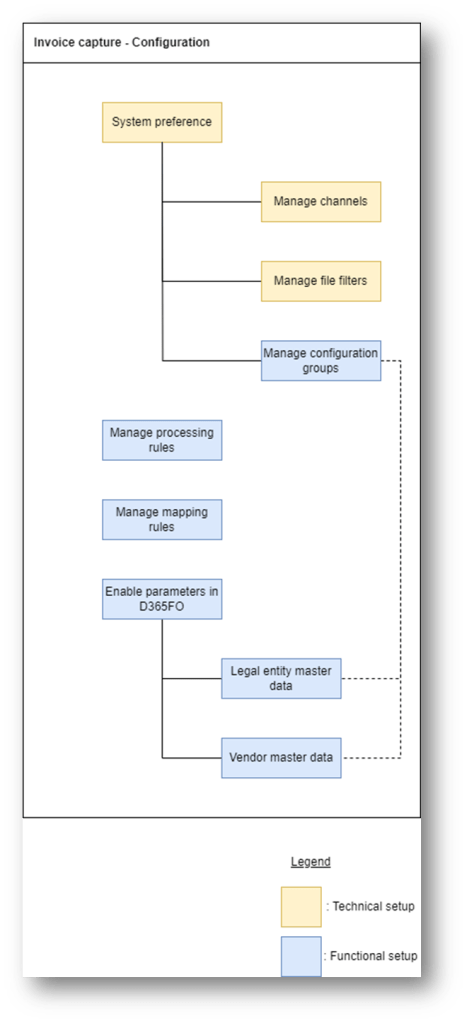
For more information about them, we can read the list below;
| Name | Description | Owner | Reference |
| System preference | Set the system preference: the AI model to use, the channel, file, | Technical team | N.A |
| Manage channel | Channels from where we receive the invoice | Technical team | N.A |
| Manage file filter | File format | Technical team | N.A |
| Manage configuration group | Choose the Invoice capture header and line field that we can see when we proceed with the invoice capture process | Functional team | link |
| Manage processing rules | The behavior to adopt in the invoice capture to individuate the purchase number, the currency and the validation roles | Functional team | link |
| Manage mapping rules | We map the decode of the values present in the invoice captured and D365FO. These values are: Vendor, Items, Procurement categories and Legal entity. | Functional team | link |
| Enable parameters in D365FO | In D365FO we indicate the legal entity object of the integration, the attachment policies and which registration for invoice type (pending invoice or invoice journal) | Functional team | link |
| Manage legal entity | Legal entity present in D365FO in the invoice capture perimeter. Syncornize automaticaly | Functional team | N.A |
| Manage vendor | Vendor master data present in D365FO. Syncornize automaticaly | Functional team | N.A |

 Dax365FO
Leave a comment