
This article will focus on the invoice capture solution from a functional standpoint. The objective is to understand the solution responsibilities of the invoice capture, the implementation elements to consider, and the effort and give a first operative guide about how to configure and work with this solution. That will support the architect and stream lead in a better understanding of how this solution fits the customer’s business requirements.
Business requirements
During the interview, usually the vendor invoice posting was one of the more critical processes to improve. Because of the volume and complexity of the business case that we can encounter, it’s a time-consuming process. First, we have to insert the document into the system, and second, we have to match the data with the command and the product receipt (the certification that the presentation was correctly done).
This solution has the aim to facilitate the insertion of the document leveraging the AI model.
Architectural perspective
This technology allows us to receive the vendor invoice and read the document throughout the IA and user review. Then, once this document is correctly acquired, we will transfer the invoice to D365FO, where we will proceed with the usual task of the matching, the approbation workflow, the invoice validation and posting in D365FO.
A brief resume of the advantages/disadvantages of this technology:
Advantage
- Help user to insert semi-automatically the invoice
- Solution ready to be deployed (AI model included)
Disadvantage
- Microsoft ecosystem-dependent (invoice capture and D365FO should be implemented together)
- AI model should learn also from the company’s documents
The solution is part of the Microsoft ecosystem, which means it’s difficult for the company to adapt to another ERP (SAP, Oracle, etc..…). As mentioned, the solution is ready to deploy, and it’s not too complicated to start. However, the AI model for reading the vendor invoice should be correctly tested, and the vendor layout should be learned from the company document. To manage the risk, we have to forecast a time for this learning. About the vendor invoice, it’s presently designed for the purchase from order. About the invoice from the journal, the individuation of the cost account is not so agile (it’s based on the cost main account set in the vendor master data or journal configuration).
So, the piece of advice is to implement this technology in the presence of Microsoft Dynamics 365FO start with some vendors to train the AI model correctly (choose the vendors with the higher volume of invoices) and push to use the pending invoice. After, we can expand the technologies, bit by bit, to the other vendors:
We can find here an overview of the solution’s components:
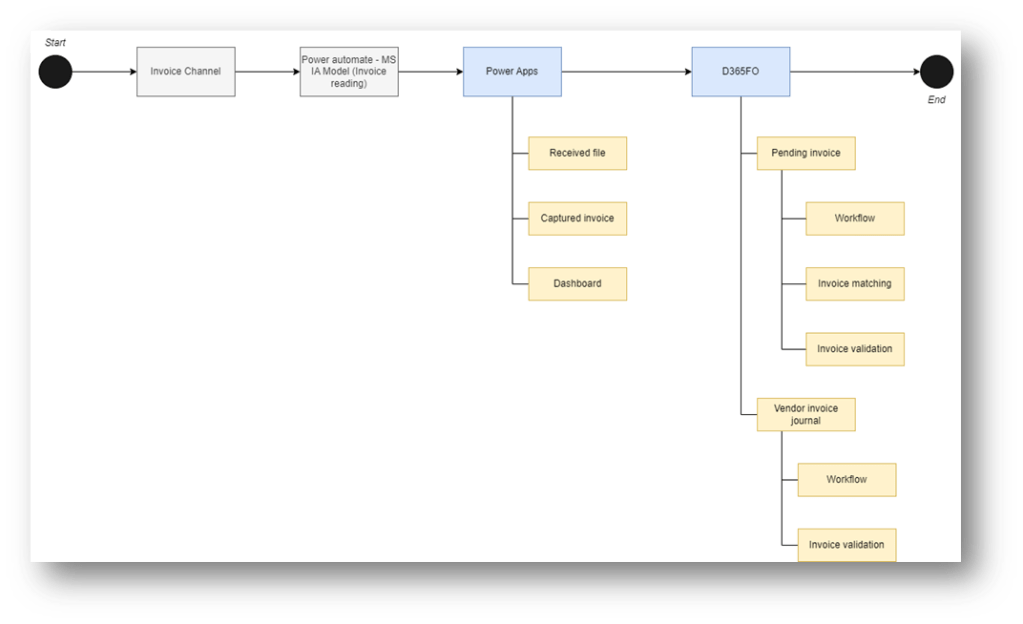
Here we can see the details about the architectural elements:
| ID | System | Component | Description |
| 1 | Invoice channel | The different channels from where we can receive your invoice (Outlook, SharePoint, import manually, etc.…) | |
| 2 | Power automate | Recover the invoice to import and trigger the IA model reading. Then, when we have our results, the invoice is sent to the Power Apps | |
| 3 | Power Apps – Invoice capture | Invoice capture apps. We receive the result of the AI model reading, and we can review the document and send it to D365FO. | |
| 4 | Received file | Form with the list of the invoices received, and the working progress status | |
| 5 | Captured Invoice | Form with the list of the invoice captured (read), and where we can review the document | |
| 6 | Dashboard | Dashboard with a resume of the point of the situation | |
| 7 | D365FO | ||
| 8 | Pending invoice | Vendor invoices can be related to or unrelated to the purchase order. The particularity is that we insert the lines throughout items or procurement categories. | |
| 9 | Vendor invoice journal | Vendor invoices are not related to purchase orders. The particularity is that we insert the lines indicating directly the cost of the main account. | |
| 10 | Workflow | Approbation workflow to go forward with the vendor invoice posting | |
| 11 | Invoice matching | Confront the value between the purchase order and the invoice. | |
| 12 | Invoice validation | Validate that the information needed is all inserted and formally correct. |
Business process
The operational details are explained in this operational article: https://daxmsdynamics365.wordpress.com/2024/07/31/presentation-invoice-capture-for-users/
However, we present here an overview of the business process:
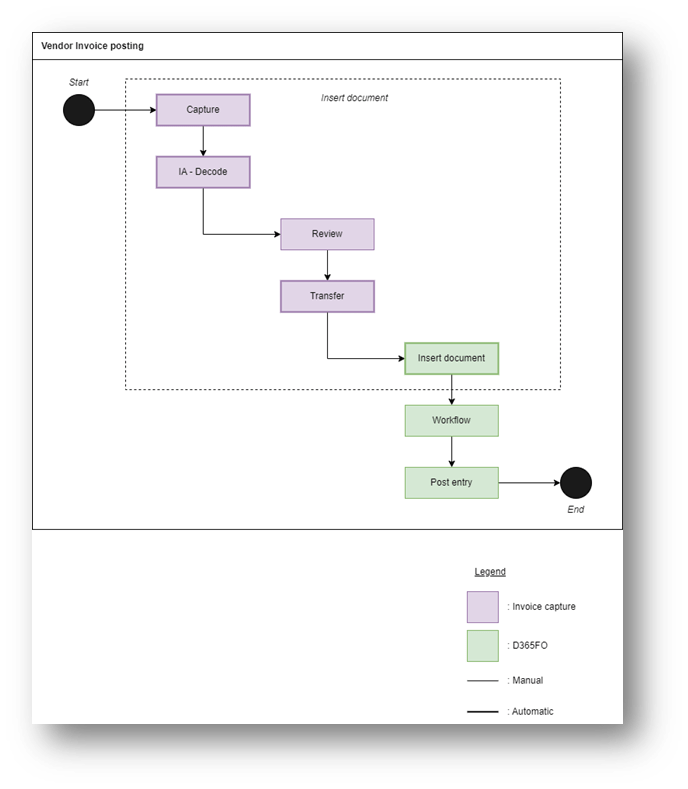
Here is the description of each activity:
| ID | Activity | Description | Owner | System |
| 1 | Capture | Receive the document from the channel (Outlook, SharePoint, etc..) | System | Power Automate |
| 2 | IA – Decode | Reading and decoding the information present in the document | System | Power Apps |
| 3 | Review | User review of the interpretation made by the IA | Account payable clerk | Power Apps |
| 4 | Transfer | Send invoice information to D365FO | System | Power Apps |
| 5 | Insert document | Receive and generate invoices in the system | System | D365FO |
| 6 | Workflow | Regular validation, and approval of the document | Account payable department | D365FO |
| 7 | Post entry | Post the document | Account payable clerk | D365FO |
About the configuration, we can find more information here: https://daxmsdynamics365.wordpress.com/2024/07/29/invoice-capture-overview-configuration/
Additional reference materials
For more information, we suggest these materials:
- Official Invoice Capture Guide: https://learn.microsoft.com/en-us/dynamics365/finance/accounts-payable/invoice-capture-overview
- TechTalk: https://www.youtube.com/watch?v=ICh5MxGVTgA
- Work with AI model: https://www.youtube.com/watch?v=QmM_bg7zXEg

 Dax365FO
Leave a comment