
Architectural perspective
D365FO offers options to process customer/Vendor payments. Understanding them is the base for architecting the cash inbound and outbound structure, adapted to the volume and company context. In this article, we will focus exclusively on creating a journal and inserting the record details about the payment we want to make.
Separately, we will discuss payment method treatment, such as EFT, SEPA, Check, etc.…, because each deserves its own article to fully understand the configuration and process involved.
When we architect the business process, at a certain point, we must choose which options are best for the user’s requirements. Usually, the criteria to choose an option instead of another option are:
- stability of the entry: the volume of changes that the user should make on the journal entry (like changing the insert payment method at this point, choosing the right bank, etc..).This point is indirectly related to the corrective analysis of our master data. The more manual choices and rectifications we have to do across the business process, the more probability we have that something wrong appears on the invoice;
- volume of the entry: the volume of the entries that we have to do.
So, the working time spent on this activity is related to the proper date insertion in the previous stage (master data, order, or invoice) and the volume of invoices to be done. As often happens, the fluidity of the financial process is also linked to the precision of customer/vendor master data maintenance and the correctness of purchase order management.
Consider that for a good implementation, we have to mix options based on the payment channel and the business case. For example, it is possible to use a payment proposal for some invoices with the EFT payment method, and for certain urgent cases like the payment of an invoice where, for some reason, posting is still in progress (for example, matching between product receipt and Invoice still in definition), we can use manual entry. We will go deep dive into this point when we talk about the different payment channels and payment methods. For now, this article present the options.
Solution D365FO
An important piece of information to understand for the no-finance folk is that the payment contains two activities:
- Pay: make and disbursement.
- March the invoice: link the disbursement and the invoice;
Below, we can find an exposition of our options. Consider that only with the first option (manual entry) the user should post the payment, and then go throughout the vendor/customer master data, and match the invoice involved. While the other options make the payment and the matching in contemporary.
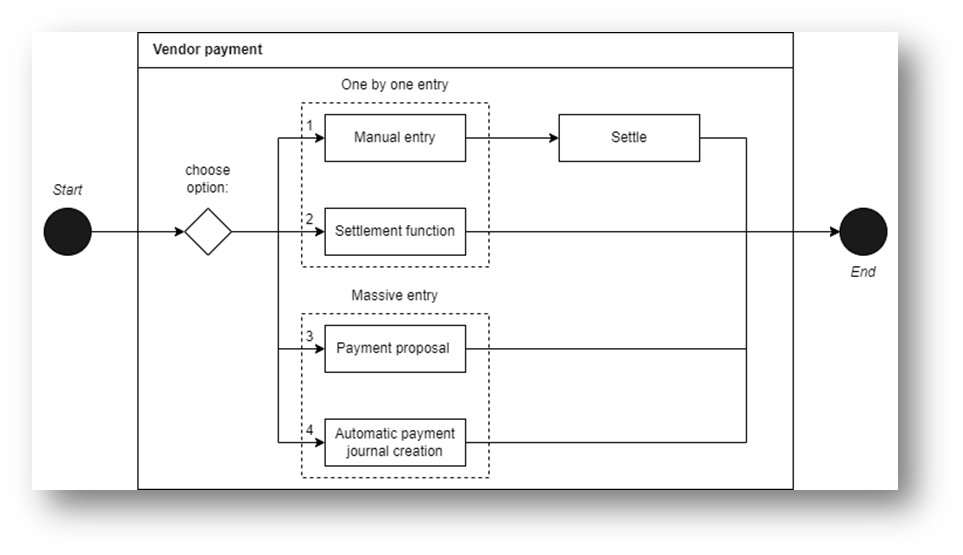
For more details, we can find in the table the full explanation of the payment option and the link to the related article:
| Id | Name | Description | Link |
| 1 | Manual entry | The entries are inserted one by one into the journal. Then, when we post the payment, we have to remember to settle the invoice to the payment manually. | https://daxmsdynamics365.wordpress.com/2024/09/26/customer-or-vendor-manual-payment/ |
| 2 | Settlement function | We insert them one by one into the journal, and during the insertion, we select the invoice to match our payment. The invoice and the settlement are done in a contemporary | https://daxmsdynamics365.wordpress.com/2024/09/26/customer-and-vendor-payment-throughout-settle-function/ |
| 3 | Payment Proposal | Demand that D365FO make a payment journal proposition based on our inserted criteria. This request for proposal payment should be done journal by journal. | https://daxmsdynamics365.wordpress.com/2024/09/27/customer-and-vendor-payment-throughout-a-proposal/ |
| 4 | Automatic payment | We automatize the creation of the journal and the payment proposal to apply to it | https://daxmsdynamics365.wordpress.com/2024/09/26/automatic-payment/ |
Tips of the chef
To avoid selecting the offset main account each time, we suggest setting the payment journal as the default on the journal configuration. Usually, the best practice is to create a journal per bank.

 Dax365FO
Leave a comment