
Introduction
On the previous article we have introduce the UML for the ERP implementation: UML for ERP implementation – Dax365FO. So, now we will see through an example what’s a use case diagram and how that can help us.
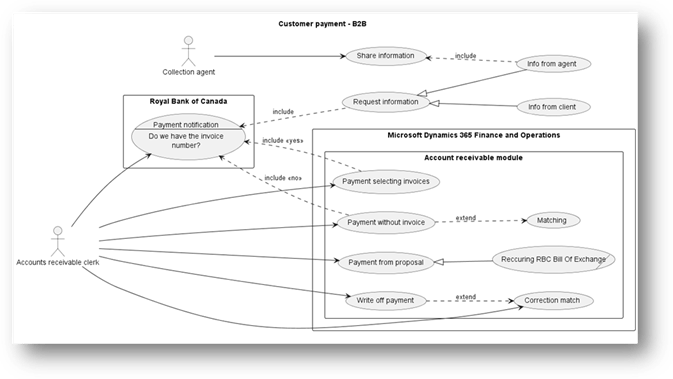
A use case outlines a scenario that the user intends to test in the system. We should separate business requirements and organize them into specific cases for testing. The use case summarizes actions and goals. For further details concerning the case description we can leverage:
- Case table: At the very button of the article, I will expose the structure of those tables. They describe detailly each on the testing to do.
- Activity diagram: It’s another UML diagram, where we will show the business process logic, and we will specify the activities flow.
A business case is a user case adapted to a specific business scenario. For example, while a general payment proposal process applies to our client’s payment journal creation, a business case would focus on generating a Bill of Exchange proposal for the Royal Bank of Canada. In short, business cases are cases for specific business situations.
However, for the explanation, you can find below a quick description of each case (it’s not the case table):
| ID | Case | Description |
| UC-001 | Payment notification | See from the bank transaction the payment details |
| UC-002 | Request information | Ask which invoices are tied to our payment |
| UC-003 | Info from client | Send information requests to the client |
| UC-004 | Info from agent | Send information requests to the collection agent |
| UC-005 | Share information | Share information concerning related invoice |
| UC-006 | Payment selecting invoices | Create a payment journal selecting precisely the invoice |
| UC-007 | Payment without invoice | Create a payment journal without selecting the invoice |
| UC-008 | Matching | Matching open invoice and payment |
| UC-009 | Write-off payment | Write-off of a wrong journal previously posted |
| UC-010 | Payment proposal | Create payment from the information contained on our invoice |
| BC-001 | Recurring RBC BoE | Generate BoE file to send to the RBC to collect directly the payment from client’s bank account |
| UC-011 | Correcting matching | Undo matching invoice and payment |
Another component to indicate in this diagram is the actor. It is recommended to define user roles specifically rather than using general labels such as “k-user” or “end-user.” Within a system, a user may have multiple roles, each with distinct permissions. Considering the design from a role-based perspective can improve security planning. In our case we have two user roles involved:
- Account receivable clerk: allowed to manage client’s payment
- Collection agent: allowed to send information payment-invoice relation
The system boundary defines the system in which the user will carry out the case. In this example, the user completes the payment notification check within the Royal Bank of Canada portal, while each request for information is considered outside the system. Payment cases are handled in D365FO within the Accounts Receivable module.
Finally, it is essential to represent the relationship between the cases and the actors involved. The categories of these relationships are as follows:
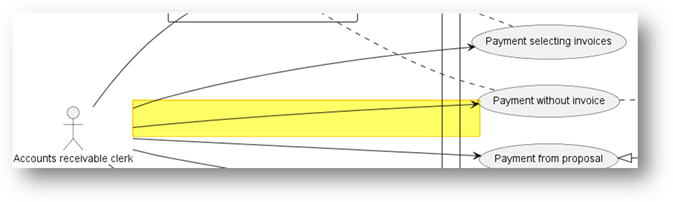
- Association: shows communication between an actor and a case. For example, the “account receivable clerk” triggers “payment without invoices”.
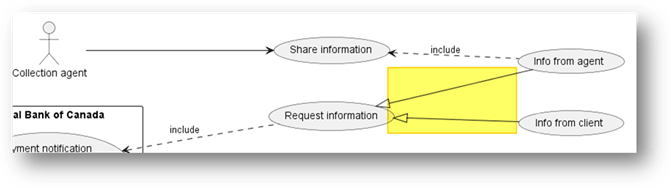
- Generalization: A parent case generalizes its child cases, which inherit its traits but add specifics. For instance, “Request of information” is a general case for both “info from client” and “info from agent.”
- Dependency: This term refers to the relationship between cases, which can take various forms:
- Include: Invocation of a case from another case. The invoked case is applied consistently. For example, after the “Payment without invoice” case, the “Matching” case is always performed.
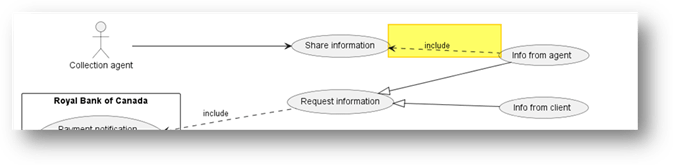
- Extend: An optional case based on a condition, such as “share information” if the collection agent has relevant data.

Case table
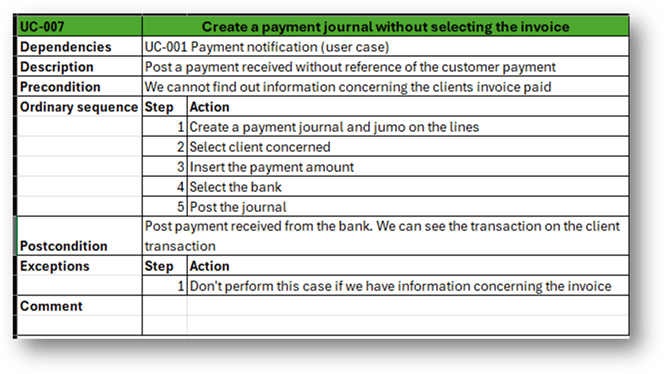
Case tables are spreadsheets showing details for each case; each table represents a single case. Below is an example for “Payment without invoice”:
PlantUml code
For reference, the following is the PlantUML code used to produce the diagram.
autor: Giorgio Bonacorsi
description: This is a sample case concerning the customer payment

@startuml

title Customer payment - B2B

left to right direction
/'actor'/
actor AccountReceivableCleark as "Accounts receivable clerk"
actor CollectionAgent as "Collection agent"

/'Use case'/
usecase RequestInformation as "Request information"
usecase InfoFromClient as "Info from client"
usecase InfoFromAgent as "Info from agent"
usecase ShareInformation as "Share information"

/'Relation'/
CollectionAgent --> ShareInformation

RequestInformation <|-- InfoFromClient
RequestInformation <|-- InfoFromAgent
ShareInformation <.. InfoFromAgent : include

rectangle "Royal Bank of Canada" {

    /'Use case'/
    usecase PaymentNotification as "Payment notification
    --
    Do we have the invoice
    number?"

    /'Relation'/
    AccountReceivableCleark --> PaymentNotification
    PaymentNotification <.. RequestInformation : include

}

rectangle "Microsoft Dynamics 365 Finance and Operations" {
    rectangle "Account receivable module" {
        /'Use case'/
        usecase PaymentWithoutInvoice as "Payment without invoice"
        Usecase Matching as "Matching"
        usecase PaymentSelectingInvoice as "Payment selecting invoices"
        usecase CorrectionMatch as "Correction match"
        usecase WriteOffPayment as "Write off payment"
        usecase PaymentFromProposal as "Payment from proposal"
        usecase/ ReccuringRBCBillOfExchange as "Reccuring RBC Bill Of Exchange"

        /'Relation'/
        AccountReceivableCleark --> PaymentWithoutInvoice
        AccountReceivableCleark --> PaymentSelectingInvoice
        AccountReceivableCleark --> CorrectionMatch
        AccountReceivableCleark --> WriteOffPayment
        AccountReceivableCleark --> PaymentFromProposal

        PaymentNotification <.. PaymentWithoutInvoice : include <<no>>
        PaymentWithoutInvoice ..> Matching : extend
        PaymentNotification <.. PaymentSelectingInvoice : include <<yes>>
        WriteOffPayment ..> CorrectionMatch : extend

        PaymentFromProposal <|-- ReccuringRBCBillOfExchange


        }
}

@enduml

 Dax365FO
Leave a comment