
Introduction
On the previous article we have introduce the UML for the ERP implementation: UML for ERP implementation – Dax365FO. So, now we will see through an example what’s a use activity diagram and how that can help us.
An activity diagram is used to represent business processes. It is considered best practice to utilize the activity diagram for providing additional details about cases identified during the analysis workshop. As such, the activity diagram offers a detailed explanation of the user or business case. The level of detail included can be adjusted as needed. Typically, a high-level overview is maintained during the pre-envision phase, with further details added in subsequent steps depending on factors such as risk and process insight.
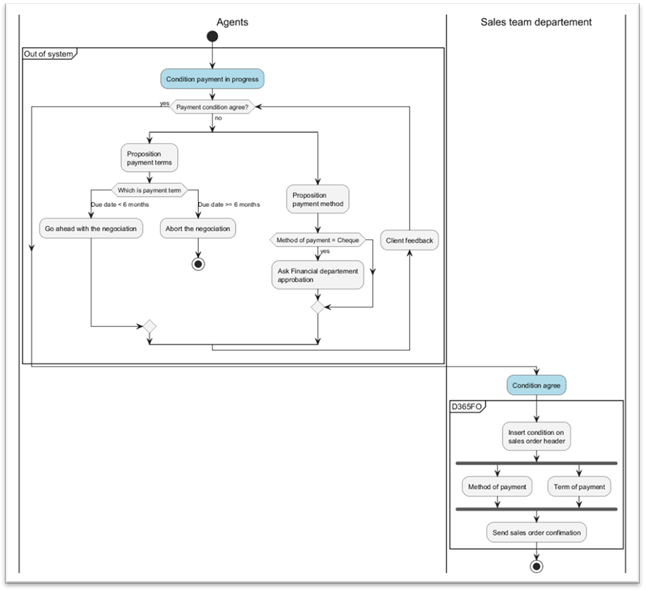
The diagram always includes a start and end state, with the control flow showing the sequence of activities to execute. Each activity represents a distinct step or action in the process.
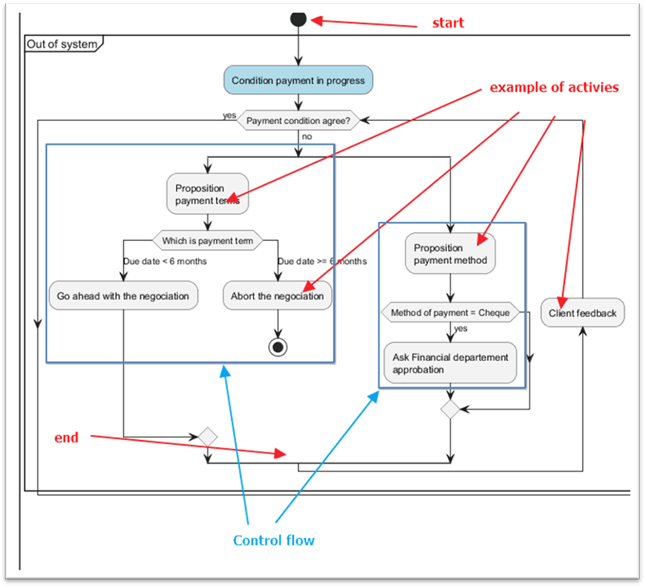
Swim lanes indicate who oversees each activity. In this example, agents define payment conditions, while the sales department team inputs the agreed values into D365FO.

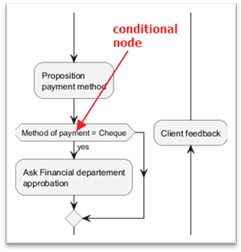
The decision note shows the conditional logic. For example, we can see that if the method of payment proposed is “cheque” the agent must ask the approval of the financial department:
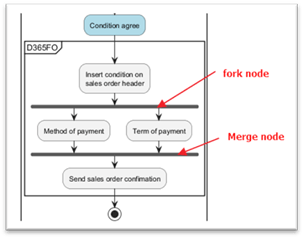
Fork and merge nodes are similar concepts: a fork node splits control flow into parallel processes, while a merge node combines multiple processes into one unified flow. Into the marge node: all preceding processes must be completed before applying the merge node.
In our example, we can see as a fork note that we split the insertion of the payment condition into two control flow: insert payment method and terms.
Vice versa, we came back to merge the control flow only when we finished to insert the payment method and terms.
PlantUml code
For reference, the following is the PlantUML code used to produce the diagram.
author: Giorgio Bonacorsi
title: Example Activity Diagram
description: Example of an Activity Diagram
date: 2023-08-06

@startuml


|Agents|

start

group Out of system {

#LightBlue:Condition payment in progress;

while (Payment condition agree?) is (no)

    split
        :Proposition
        payment terms;
            switch (Which is payment term)
            case (Due date < 6 months)
                :Go ahead with the negociation;
            case (Due date >= 6 months)
                :Abort the negociation;
                stop
                break
            endswitch

    split again
        :Proposition
        payment method;
        if (Method of payment = Cheque) then (yes)
            :Ask Financial departement
            approbation;
            endif

    end split
    backward :Client feedback;

endwhile (yes)
}

|Sales team departement|

#LightBlue:Condition agree;

group D365FO {
    :Insert condition on
    sales order header;

    fork
        :Method of payment;
    fork again
        :Term of payment;

    end fork

    :Send sales order confimation;
}

stop

@enduml
 Dax365FO
Leave a comment