
Business requirement
This feature adds the ability to enter original invoice details when issuing a credit note. It’s purely statistical information, designed to help users quickly identify the original document behind a purchase credit note. The principal goal is to capture this information and display it on the credit note layout.
Configuration
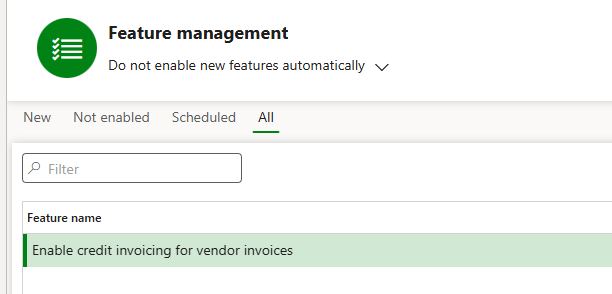
Go to: System administration> Workspaces> Feature management.
Acrtivate the feature: Enable credit invoicing for vendor invoices.
Process
During the invoicing process, before the posting we need to add an activity: insert original invoice data. In this step, we will add the statistical data concerning the original invoice.
Then we can inquiry the data.
Activity: insert original invoice data
Here’s an example using the Vendor invoice journal. Note that the steps are identical if you choose to invoice from a Purchase order or Invoice register.
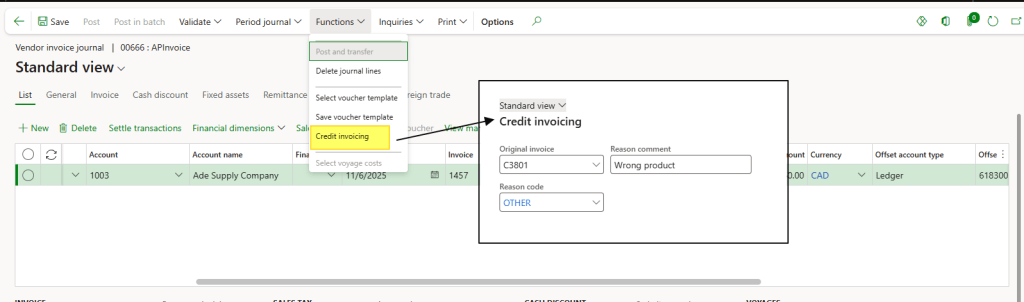
Create a vendor invoice journal as usual. Then, click Functions > Credit invoice to open the dialog and enter the statistical details for the original invoice.
Activity: Inqury data
This data should be added to the document layout. There is no dedicated form or report to view this information directly tied to the credit note. You can retrieve it from the following tables:
- CustVendCreditInvoicingTable: Index of all reference record in the system;
- CustVendCreditInvoicingJour: Detailed information about the original invoice linked to the credit note;

 Dax365FO
Leave a comment