
Business requirements
This function allows you to set the negative credit limit permitted by the bank. The system will display a warning or error message when an attempt is made to post a transaction that would exceed this threshold.
Configuration
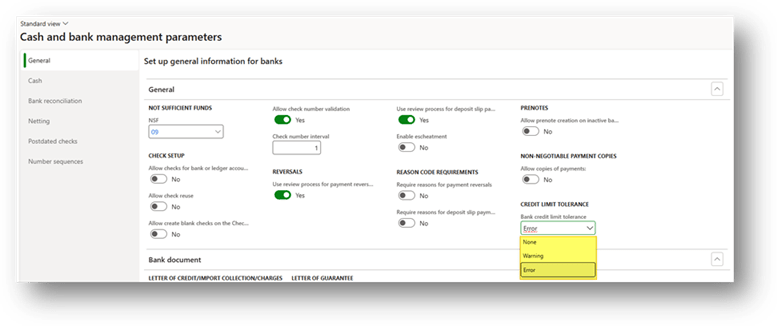
Path: Cash and bank management> Setup> Cash and bank management parameters.
The only configuration required is at the bank account parameters level. We need to decide whether Dynamics 365 Finance and Operations should display a warning (allowing the user to proceed) or an error message (blocking the posting) when the negative credit limit is exceeded:
Process
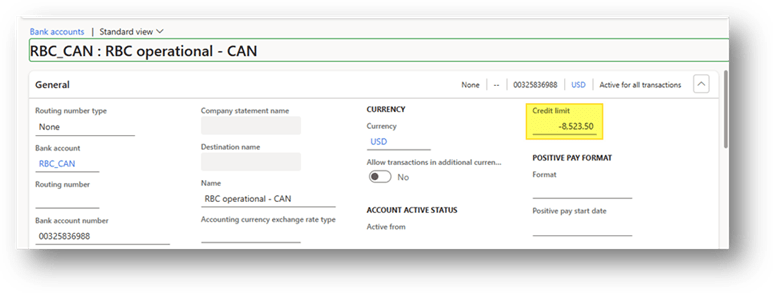
1- Insert the credit limit
Path: Cash and bank management> Bank account> Bank accounts> [Select our bank account]
Enter the negative credit limit (overdraft limit) in the bank account master data;
2- Insert entry
When you enter a payment in the journal, we can see before the posting the bank balance:
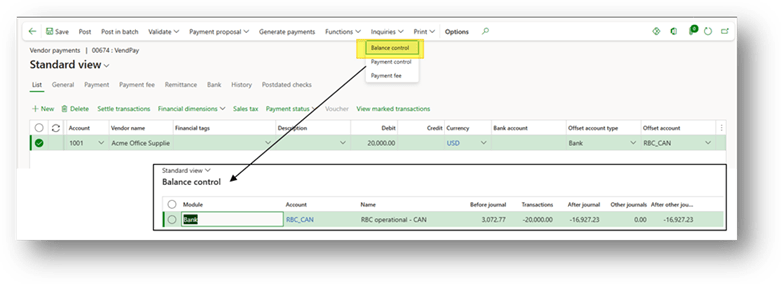
During the simulation validation or the posting a warning or error message appears if the transaction would exceed the configured negative credit limit.

 Dax365FO
Leave a comment