
Introduction
Throughout my career, I have encountered several approaches to analyzing business needs in order to align ERP implementations effectively. This is a strategic imperative: you can have the best technical and functional expertise, but without an overall understanding of the business, it is impossible to deliver a consistent and effective solution. Each project stream tends to follow its own path, making it difficult (even within the same stream) to maintain a unified view of the solution across all related topics.
To address this challenge, Microsoft provides the Microsoft Dynamics 365 Business Process Catalog, which is regularly updated with standard processes. I strongly support this kind of initiative because it offers a comprehensive map of standard processes that we can leverage to better satisfy client requirements while reducing risks.
For further details and curiosity, you can explore more information on the official Microsoft Learn page: https://learn.microsoft.com/en-us/dynamics365/guidance/business-processes/about
Disclaimer
I am sharing insights from my personal experience, but there are two main sources of risk that I have learned from numerous implementations: not having a business process catalog at all or relying on an overly authoritarian one. Between these two extremes, the absence of a catalog is the lesser evil. Let’s explain the nuances.
Strategically maturing an organization’s insight into how it runs its business is an act of rationalization. This means we must rationalize the various use cases: identifying which are routine, which are periodic or exceptional, the conditions under which they occur, their priorities, and so on. Ultimately, we need to build a clear map of how the business operates in order to pinpoint where the ERP implementation can provide support or add real value.
Doing this work entirely from scratch is possible, but it is both costly and risky. It is costly in terms of time and risky because the outcome depends heavily on the skills of the functional consultants involved. A strong consultant may excel in technical areas but lack depth in the specific ERP implementation and disoriented concerning the process and their integration.
On the extreme opposite end, an authoritarian business process catalog is the worst scenario. Often driven by commercial pressures, partners may push a “take-it-or-leave-it” approach to minimize costs. This can quickly become profoundly incorrect if applied rigidly. Companies are organic entities, built on the collaboration and coordination of people to achieve a purpose. Just as animals evolve by adapting their DNA, genes to gain competitive advantages, companies must evolve to dominate their environment. Entering a company and imposing identical standard processes risks eroding competitive edge. The true role of a functional consultant is to deeply understand the business and deliver solutions that unlock the company’s potential rather than restrict it.
Consequently, the Microsoft Business Process Catalog is like a map: it provides valuable insights and accelerators, but it does not relieve functional consultants of their responsibilities. The core work of implementation, rationalization, analysis, path selection, accountability, and overall responsibility, remains in the hands of the partner.
Practical use case
The best way to explain this is with an example. Imagine I am the Procure-to-Pay (P2P) stream lead and I want to organize my analysis around the purchase requisition process. Therefore, I need to collect the requirements and speak with key users for whom D365FO is a new product.
Let’s open the Business Process Catalog from this link, and see what we have:
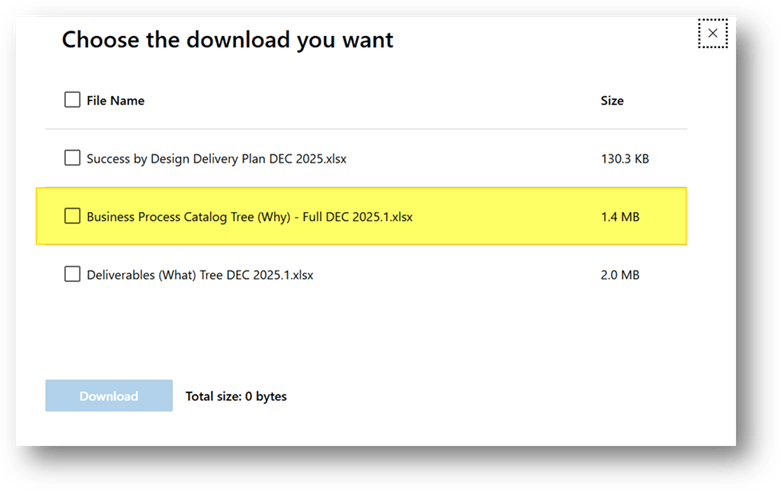
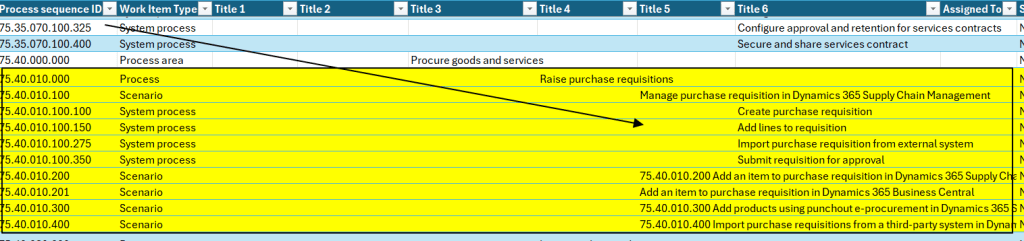
You’ll see a hierarchical structure with several levels, each represented by columns or indented titles. Here’s what these levels mean:
- Category: The top-level, referring to our tree description.
- Stream: The business stream or value stream, representing a major flow or department-aligned grouping.
- Process Group: A collection of related processes, typically corresponding to “business process areas”
- Process: A single business process with a clear start and end, designed to achieve a specific result. Processes consist of sequenced activities that can be triggered by various conditions or events.
- Activities: Individual steps performed to execute the process; Dynamics 365 (specific actions tied to forms, pages, or UI elements).
- Task: A granular element of work performed in D365FO

Here is a ready-to-use list of discussion topics:
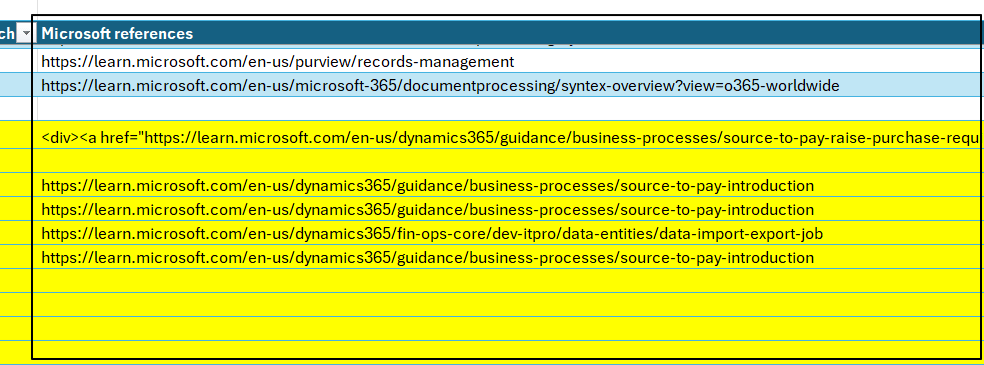
And if I need even more details, the Business Process Catalog conveniently includes direct references and hyperlinks to official Microsoft documentation.
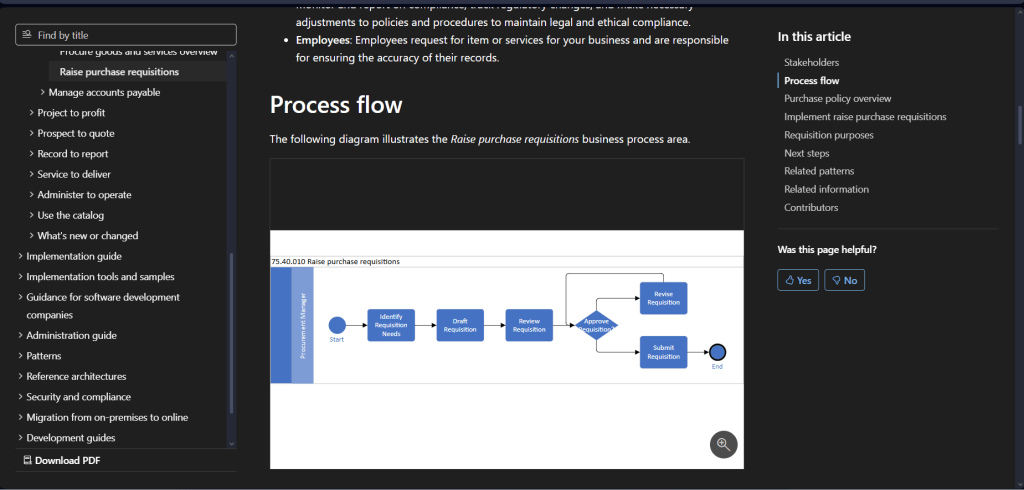
Lastly, for even more in-depth details, I can explore the process explanation from the Microsoft business process library: https://learn.microsoft.com/en-us/dynamics365/guidance/business-processes/source-to-pay-raise-purchase-requisitions-overview
Conclusion
When implementing Dynamics 365, there are three key dimensions to consider:
- The business model (how the business operates);
- The application (how D365FOworks, including configurations, processes, etc.);
- The project organization.
I might write a separate article on the third one later, but the business model focuses on understanding current and future operations, while the application dimension covers the system’s standard capabilities and setups.
I really appreciate this Microsoft-sponsored approach with the Business Process Catalog because it addresses business model analysis while introducing direct mappings to application elements (down to Levels 4–5 system processes and Level 6 Applocation use cases). As mentioned in the earlier precaution/disclaimer, it’s a powerful accelerator that quickly maps business needs, especially in large implementations. However, it should not become a source of de-responsibilization for the partner or key users when it comes to deeply analyzing requirements.

 Dax365FO
Leave a comment