
Go to: Product information management> Setup> Dimension and variant groups> Storage dimension groups.
The storage dimension group enables the inventory dimensions that can be used on records, and it determines the level of tracking granularity for inventory transactions.
- Active: We can user this dimension
- Blank receipt or issue allowed: Allow to don’t insert this dimension on our receipt or issue documents;
- Physical inventory: Tracks physical item quantities by this dimension (e.s items per warehouse, location, etc..). Moreover, we will track even the cost by this dimension (es. costs per warehouse, location, etc..). Often is a estimation cost because is the cost present our order, by without final validation.
- Financial inventory: Absorption of the financial cost by our warehouse transaction. The financial cost are the actual cost tied the AP invoices, and production ended. These document validate definitively the transaction cost;
- Coverage plan by dimension: Used by the MRP to calculate to coverage of the demande (cover the demande by warehouse, location, etc.. demande);
- For purchase or sales price: Enable to use these dimension on the trade agreement
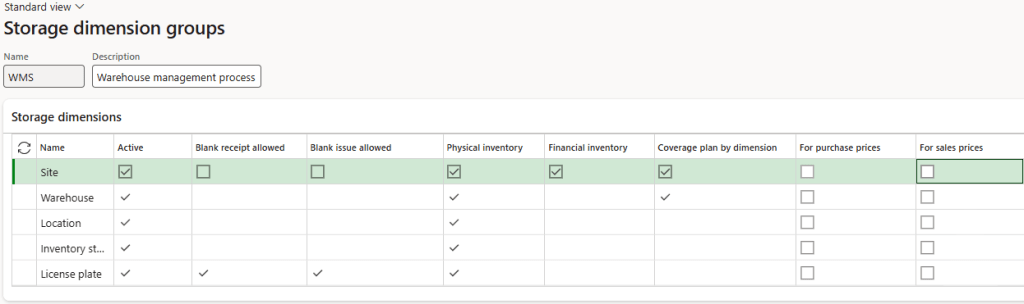
For the WMS, see the session “warehouse”. To active the utilization of the WMS we must select “use warehouse management process”.
Note: This configuration cannot be changed if there are posted transactions related.
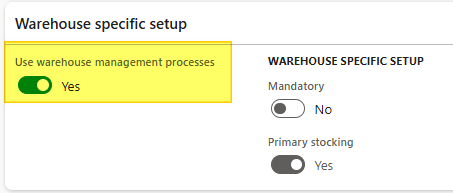
Always about the WMS:
Mandatory: Indicates that the warehouse is a required field for items using this storage dimension group.
Primary stocking: Gives the warehouse priority during the reservation process (it becomes the default and often locked dimension for reservations).

 Dax365FO
Leave a comment