
Requirement
Often, we need to insert a new entry in the general journal via the Excel add-in, but the financial dimension column is missing. How do we add it?
This is a common question from accounting clerks.
This article is an extension of a previous one where I explain how to use the Excel add-in: https://dax365fo.org/2024/06/11/general-journal-excel-add-in/
Solution
Configuration
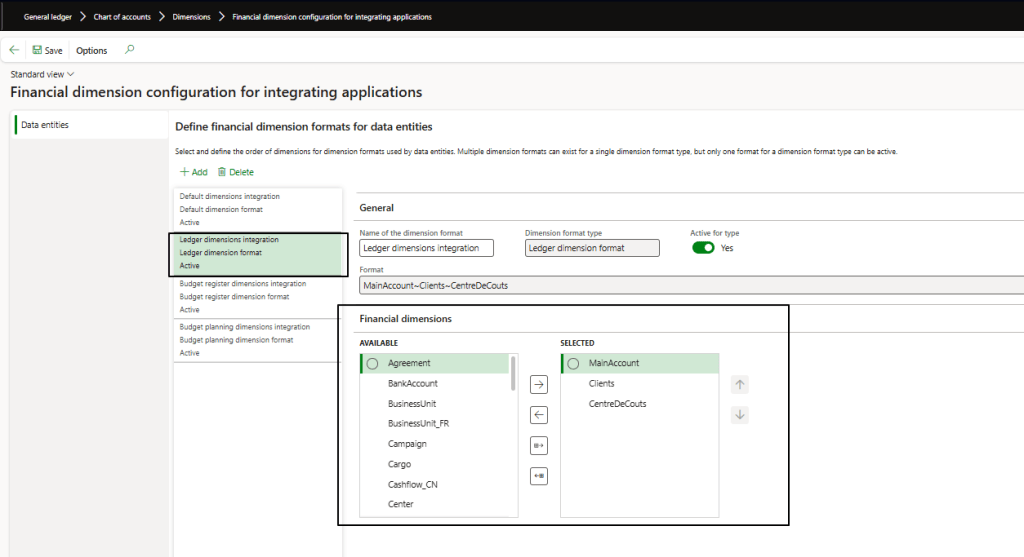
Path: General ledger> Chart of accounts> Dimensions> Financial dimension configuration for integrating applications.
Ensure the required financial dimensions are included in the D365FO integration with the external system. Verify that your needed dimensions are present and in the correct order.
Note: This configuration also affects loading general journal entries via DMF (Data management framework – General journal entity).
Process
Path: General ledger> Journal entries> General journals.
From the General journal, open the Excel add-in. Add the column AccountDisplayValue to your design.
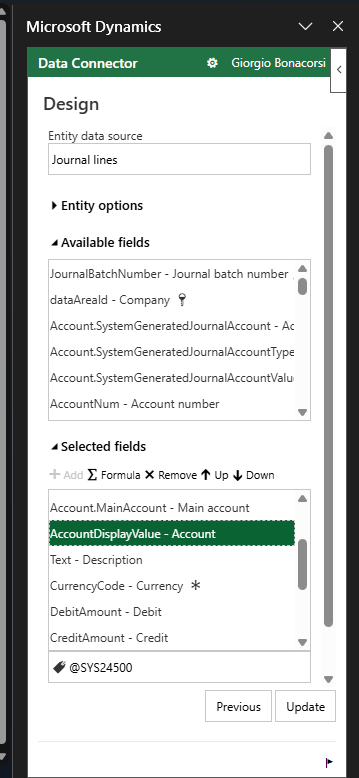
You can now modify the financial dimensions in your journal. Their order follows the configuration done previously.



Leave a Reply