
Introduction
In intercompany orders, a vendor payment made in one legal entity automatically represents the customer payment in the other legal entity.
D365FO can automatically apply the customer payment to the invoice when the corresponding vendor payment is posted in the other legal entity.
Configuration
During the setup of intercompany policies, it is necessary to define the payment journal that the selling legal entity will use. Insert the payment journal.
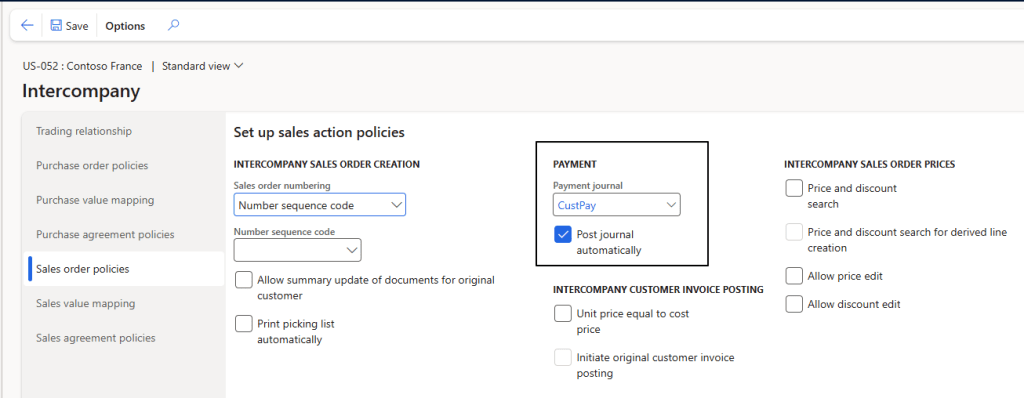
We can flag “Post journal automatically”. Remember that if we post the vendor payment automatically, D365FO will also automatically post the corresponding customer payment in the other legal entity. This means wee need to set a the journal level the offset:
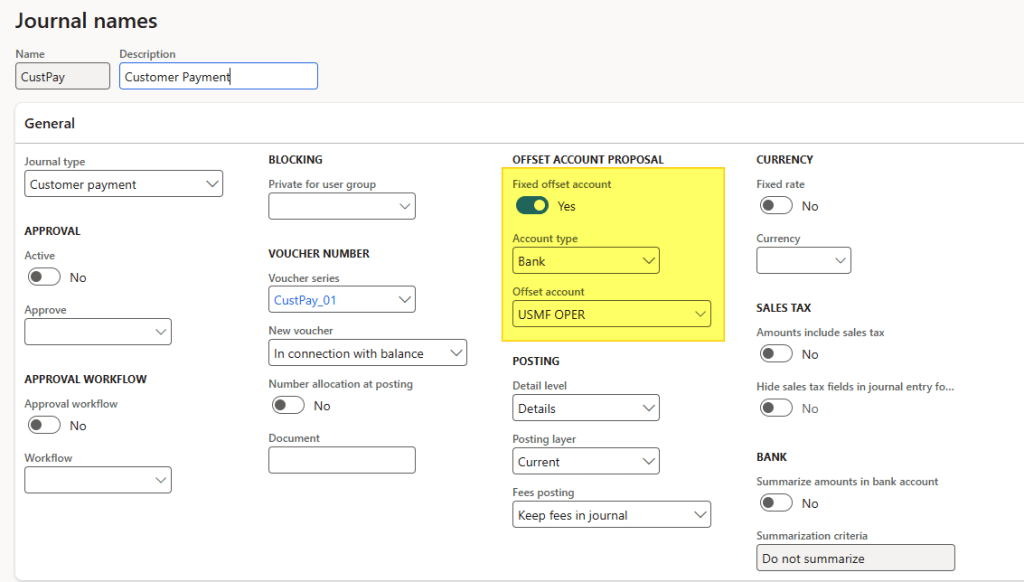
Process
Vendor payment journal
Create the intercompany vendor invoice and process the payment as you normally would:

The system will automatically create the customer invoice corresponding to the vendor invoice and, if the option is enabled, post it.



Leave a Reply